Moving from html-to-image to an API: the migration notes
One job, written twice. On the left the library draws a node in the visitor’s browser. On the right the same job is a request from your server.
Before: in the browser
import { toJpeg } from 'html-to-image'

const node = document.getElementById('receipt')
const dataUrl = await toJpeg(node, {
  quality: 0.9,        // 0 to 1
  pixelRatio: 2,
  backgroundColor: '#ffffff',
  filter: (n) => !n.classList?.contains('no-print'),
})
// dataUrl is a base64 string, in the browser
After: one request
// In the page: take the markup of the node, not a picture of it.
const html = '<!doctype html>'
  + '<link rel="stylesheet" href="https://your-app.example/app.css">'
  + document.getElementById('receipt').outerHTML

// On your server: one request. The key stays off the page.
const response = await fetch('https://curlshot.com/api/v1/screenshot', {
  method: 'POST',
  headers: {
    'X-Access-Key': process.env.ACCESS_KEY,
    'Content-Type': 'application/json',
  },
  body: JSON.stringify({
    html,
    selector: '#receipt',          // only this node
    format: 'jpeg',
    image_quality: 90,             // 1 to 100
    device_scale_factor: 2,
    hide_selectors: ['.no-print'], // like filter
    styles: 'body{background:#fff}',
  }),
})
const jpeg = Buffer.from(await response.arrayBuffer())
The request follows the documentation and was not sent in this run. The test further down used only the libraries and a browser.
The one change: markup, not a node
The library copies a live node, turns the copy into an SVG that holds the HTML in a foreignObject, and draws that SVG on a canvas.[1] It all happens in the page. An API cannot reach into that page, so you hand it the markup instead.
Library
- The visitor opens your page.
- A script copies the node, with its computed styles.
- The copy becomes an SVG, then a canvas, then a file.
- The file is in the visitor’s browser.
API
- Your server has the markup of the node.
- It sends the markup in the
htmlfield of a POST request. - A browser on the service draws the page and cuts out the element.
- The file comes back to your server.
What the markup has to be
https address that is reachable from the public internet. Addresses on localhost or a private network are blocked. Read the rules on HTML and Markdown input.The option ledger
Each call or option of the library, the field that takes its place, and the thing that changes for you. Two rows have no answer, and the table says so.
| In html-to-image | In the API | What changes |
|---|---|---|
| toPng(node) | format=png (the default) | You send the markup of the node, not the node. The answer is the file itself, or JSON with a link if you ask for response_type=json. |
| toJpeg(node, { quality }) | format=jpeg and image_quality | The library takes 0 to 1; the API takes a whole number from 1 to 100, and the default is 80. |
| toBlob(node, { type: "image/webp" }) | format=webp | png, jpeg, webp and pdf are available, and mp4, webm and gif for a scrolling video. |
| pixelRatio | device_scale_factor | The library uses the pixel ratio of the visitor’s screen unless you set it. The API default is 1, and the range is 1 to 3, so set it on purpose. |
| width, height | viewport_width, viewport_height, or selector | The library forces a size on the node. With the API you choose the window, or capture one element with selector and take its own size. |
| backgroundColor | a background in your CSS, or omit_background=true | There is no fill option. Paint the colour in your markup, or leave the page transparent with png or webp. |
| filter(node) | hide_selectors, or leave the node out of the markup | A function becomes a list of CSS selectors. Anything more complex is decided before you build the markup. |
| style | styles | An object of styles for the node becomes CSS text added to the page. |
| fontEmbedCSS, skipFonts | wait_until=networkidle or delay | The browser that draws the page loads its fonts itself. You wait for them instead of embedding them. |
| cacheBust | cache, cache_ttl, cache_key | Opposite default: caching is off, and a cache hit is not counted in your quota. Turn it on for cards that repeat, and change cache_key to force a fresh render. |
| imagePlaceholder | none | A failed image is not replaced by a placeholder. Fix the address, or check that it is a public https address. |
| toSvg, toCanvas, toPixelData | none | The API returns png, jpeg, webp, pdf or video, not an SVG, a canvas or raw pixels. |
When to keep the library
A move is not always the right call. Three things a browser library does better.
The thing on screen is not on any server
A signed-in page, text typed into a field, a chart in the middle of an animation: the library draws what the visitor sees right now. An API draws the markup you send, and state kept in memory does not travel with the markup.
Nothing has to be sent anywhere
For a "download this as an image" button on a page that holds private data, drawing in the browser keeps the data on the visitor’s machine. A request sends the markup to a service.
It costs nothing per picture
A library has no quota. An API counts one screenshot per successful render, and the Free plan has a fixed number a month.
The reverse is also true. An image made by schedule, for a thousand articles, or when no browser is open has no visitor to run a script. That is where a request fits, and the six templates in the earlier post are written for it.
A test of eight pages
Three pictures of each page: what the browser draws, what html-to-image 1.11.13 makes and what html2canvas 1.4.1 makes. html-to-image 1.11.13 matched on 6 of 8 pages and html2canvas 1.4.1 on 3. Eight pages are a probe. They show where to look on your own pages, and they are not a ranking.
1.A plain card
A heading, a line of text, a coloured edge, the system font. Most receipts and share cards look like this.
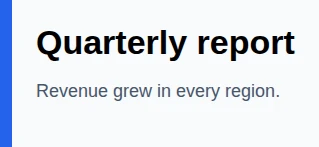
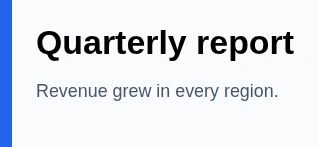
Same layout and text.
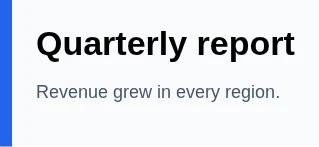
Same layout and text.
2.A shadow and rounded corners
A raised box with a radius: the look of nearly every modern card.
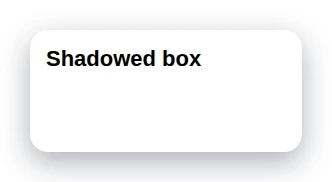
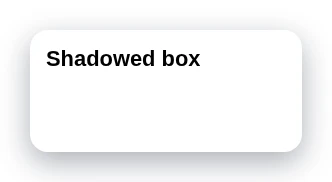
Same corners and shadow.
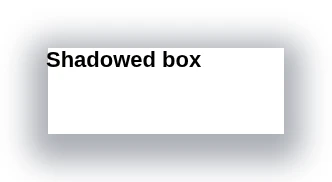
The corners came out square, and the shadow is darker.
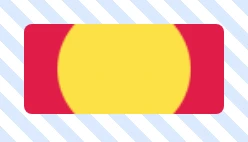
3.A striped background and object-fit
A repeating gradient behind a photo that is cropped to a box with object-fit: cover.
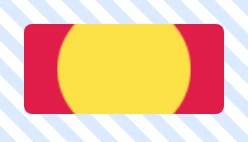
Same stripes, same crop.

The stripes are missing, and the photo is squeezed into its box instead of cropped.
4.A filter, a blend mode and a frosted panel
filter: blur, mix-blend-mode and backdrop-filter, as in glass-style headers.
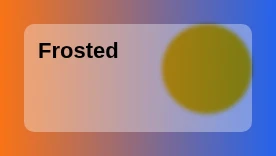
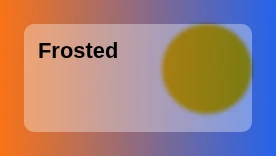
Same blur and blending.
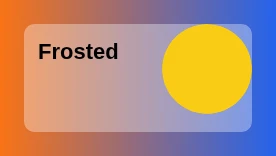
The blur and the blending were ignored: the circle is a flat yellow.
5.A web font from another origin, with a CORS header
A font file on a CDN. The server allows other origins to read it.
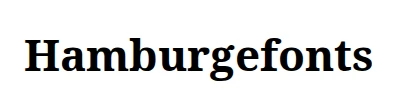
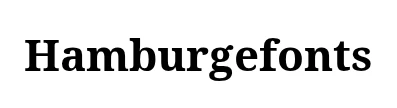
The font was embedded and the text matches.
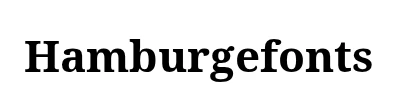
The text matches.
6.An image from another origin, without a CORS header
A logo or a user photo on a different host that does not send an Access-Control-Allow-Origin header.

No picture. The promise was rejected with an event of type error.

A picture came back with an empty space where the image should be.
7.An iframe with its own page
An embedded widget, a map or a video player.
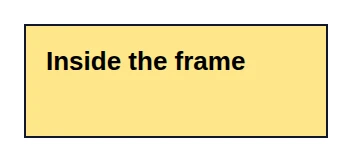
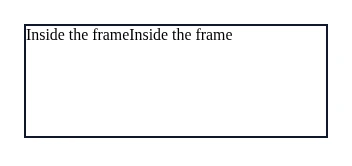
The frame’s words came out as plain unstyled text, twice, and its yellow background is gone.
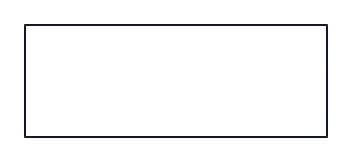
The frame is empty.
8.A canvas the page drew
A chart drawn by a script. The canvas is not tainted, because it holds no picture from another origin.
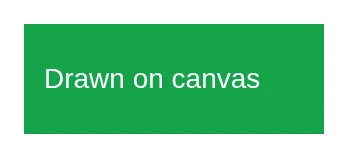
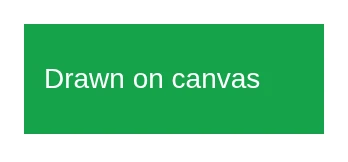
Identical.
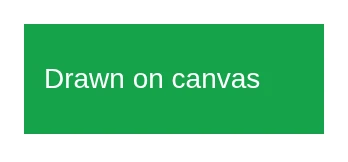
Identical.
The limits behind the failures are the library’s own: it cannot read an image from another origin without a CORS header, and its notes say a very large DOM can fail.[1] For html2canvas 1.4.1, the list of CSS it does not support is on its site.[2]
Five steps to move
Make the markup stand alone
Every stylesheet, image and font must have a full https address that is reachable from the public internet. Addresses on localhost or a private network are blocked, and relative paths have nothing to be relative to.
Move the call to your server
The access key must not be in a web page. Build the request on your server, or sign the link so that the page never holds a usable key.
Translate the options
Use the ledger above. Start with format, image_quality, device_scale_factor and selector; most calls need nothing else.
Compare five of your own pages
Draw the same five nodes with the library and with the API, and put the pictures side by side. Look at the places this test found: corners, blur, frames and images from other hosts.
Turn on the cache for repeats
A card for the same article is the same card. Set cache=true so that a repeat costs no screenshot, and change cache_key when the card really changed.
The Free plan of CurlShot needs no card, so the five-page comparison in step 4 costs nothing. See the plans and the HTML to image tool.
How this was tested
On 2 November 2026, Chromium 153.0.8010.12 driven by Playwright, with html-to-image 1.11.13 and html2canvas 1.4.1. Each test page was opened from a small server on 127.0.0.1, and a second server on another port served the files that must come from another origin. The library ran inside the page and drew the node to a PNG. The reference is a screenshot of the same element taken by the browser itself.
The pictures were compared by eye, and the notes say what was seen. Text edges differ by a pixel here and there between any two ways of drawing, and that was not counted as a difference. The font page was run twice: the first time the font file had no CORS header, so the browser itself refused it and the test said nothing, and the table shows the run with the header set.
What this test did not cover: the API of CurlShot. Its request is written from the documentation. Other versions of the libraries, other browsers and your own pages may give other results.
Questions people ask
How do I replace html-to-image with an API?
Send the markup of the node to the API instead of the node itself, from your server. Make the markup stand alone with full https addresses, then map the options: format for the output, image_quality for quality, device_scale_factor for pixelRatio, selector to capture one element. CurlShot accepts the markup in the html field of a POST request.
Why does html-to-image fail on an image from another site?
The library fetches each image and embeds it, and a browser only lets a script read an image from another origin when that server sends a CORS header. In a test on 2 November 2026 a page with such an image produced no picture from html-to-image 1.11.13, and html2canvas 1.4.1 left an empty space. A server-side browser draws the page as it would any page, so it does not need to read the image's bytes.
Does html2canvas support box-shadow and CSS filters?
Its own list names box-shadow, filter, mix-blend-mode, object-fit and repeating-linear-gradient as unsupported. [2] In the test on 2 November 2026, html2canvas 1.4.1 drew the shadow but with square corners, ignored a blur and a blend mode, and lost a repeating gradient and the crop of object-fit.
Is html-to-image or an API better for generating images?
For a button that downloads what the visitor sees, the library is simpler and keeps the data on their machine. For images made on a schedule, for many pages, or with no browser open, a request to an API is the way. The two are not rivals; many products use both.
How much does it cost to generate an image with the API?
Each successful render counts as one screenshot, and a cache hit does not. The Free plan of CurlShot has 100 a month without a card (read from the pricing page on 2026-11-02). See the pricing page for the paid plans.
Sources
- [1]GitHub, bubkoo/html-to-image, html-to-image: generates an image from a DOM node using HTML5 canvas and SVG (README). Checked .
- [2]html2canvas, html2canvas: supported and unsupported CSS properties. Checked .
Read next
- CookbookHTML to image: six templates you can copySix copyable HTML and CSS templates: social card, certificate, receipt, quote card, ticket and stat card, with sizes and the rules that make them render right.
- Cheat sheetSocial preview image sizes: the OG cheat sheetOpen Graph image sizes for Facebook, LinkedIn, WhatsApp, iMessage, Discord, Slack and Google Discover, drawn to scale, with the tags and the fixes.
- Rosetta stoneWebsite screenshot code examples in 8 languagesThe shortest working code to save a full-page screenshot of a website in curl, Node.js, Python, PHP, Go, Ruby, Java and C#, side by side.