HTML and Markdown input
Send your own HTML or Markdown and get it back as an image or PDF. Good for social cards, invoices and reports.
You do not need a web page that is online. Send the markup itself.
curl -X POST "https://curlshot.com/api/v1/screenshot" \
  -H "X-Access-Key: YOUR_ACCESS_KEY" \
  -H "Content-Type: application/json" \
  -d '{
    "html": "<body style=\"margin:0;display:grid;place-items:center;height:100vh;font-family:sans-serif;background:#0f172a;color:#fff\"><h1 style=\"font-size:72px\">Hello from HTML</h1></body>",
    "viewport_width": 1200,
    "viewport_height": 630
  }' \
  --output card.png
You get card.png: a 1200 by 630 image with white text centred on a dark background. Our browser drew your HTML the same way it draws any page.
#When to use it
- Social cards. The preview image that shows when a link is shared.
- Documents. Invoices, receipts, certificates and reports, usually with
format=pdf. - Pages that are not public. A page on your own computer cannot be reached by
url. Sending its HTML works.
#Send it with POST
HTML is long and full of quotes, angle brackets and line breaks. Those are awkward in a web address. So send html and markdown in a POST request with a JSON body, as The screenshot URL describes. JSON is a text format for structured data.
Let your language build the JSON. It takes care of escaping the quotes.
# Keep the HTML in a file and let jq build the JSON body.
jq -n --rawfile html card.html '{html: $html, viewport_width: 1200, viewport_height: 630}' |
  curl -X POST "https://curlshot.com/api/v1/screenshot" \
    -H "X-Access-Key: YOUR_ACCESS_KEY" \
    -H "Content-Type: application/json" \
    -d @- \
    --output card.png
import { readFile, writeFile } from 'node:fs/promises'
const html = await readFile('card.html', 'utf8')
const response = await fetch('https://curlshot.com/api/v1/screenshot', {
method: 'POST',
headers: {
'X-Access-Key': 'YOUR_ACCESS_KEY',
'Content-Type': 'application/json',
},
body: JSON.stringify({ html, viewport_width: 1200, viewport_height: 630 }),
})
if (!response.ok) throw new Error((await response.json()).error_message)
await writeFile('card.png', Buffer.from(await response.arrayBuffer()))import requests
with open("card.html", encoding="utf-8") as f:
html = f.read()
response = requests.post(
"https://curlshot.com/api/v1/screenshot",
headers={"X-Access-Key": "YOUR_ACCESS_KEY"},
json={"html": html, "viewport_width": 1200, "viewport_height": 630},
)
response.raise_for_status()
with open("card.png", "wb") as f:
f.write(response.content)<?php
$body = json_encode([
'html' => file_get_contents('card.html'),
'viewport_width' => 1200,
'viewport_height' => 630,
]);
$context = stream_context_create([
'http' => [
'method' => 'POST',
'header' => "X-Access-Key: YOUR_ACCESS_KEY\r\nContent-Type: application/json",
'content' => $body,
],
]);
$image = file_get_contents('https://curlshot.com/api/v1/screenshot', false, $context);
file_put_contents('card.png', $image);package main
import (
"bytes"
"encoding/json"
"io"
"net/http"
"os"
)
func main() {
html, _ := os.ReadFile("card.html")
body, _ := json.Marshal(map[string]any{
"html": string(html),
"viewport_width": 1200,
"viewport_height": 630,
})
req, _ := http.NewRequest("POST", "https://curlshot.com/api/v1/screenshot", bytes.NewReader(body))
req.Header.Set("X-Access-Key", "YOUR_ACCESS_KEY")
req.Header.Set("Content-Type", "application/json")
resp, err := http.DefaultClient.Do(req)
if err != nil {
panic(err)
}
defer resp.Body.Close()
file, _ := os.Create("card.png")
defer file.Close()
io.Copy(file, resp.Body)
}require "net/http"
require "json"
uri = URI("https://curlshot.com/api/v1/screenshot")
request = Net::HTTP::Post.new(uri)
request["X-Access-Key"] = "YOUR_ACCESS_KEY"
request["Content-Type"] = "application/json"
request.body = JSON.generate(
html: File.read("card.html"),
viewport_width: 1200,
viewport_height: 630
)
response = Net::HTTP.start(uri.host, uri.port, use_ssl: uri.scheme == "https") { |http| http.request(request) }
File.binwrite("card.png", response.body)Send exactly one source. A request with both html and url, or both html and markdown, returns invalid_options.
#An Open Graph card
Open Graph is the standard that tells social networks which image to show for a link. The usual size is 1200 by 630 pixels.
Save this as card.html:
<!doctype html>
<html>
  <head>
    <meta charset="utf-8">
    <link rel="stylesheet" href="https://fonts.googleapis.com/css2?family=Inter:wght@500;800&display=swap">
    <style>
      body {
        margin: 0;
        width: 1200px;
        height: 630px;
        box-sizing: border-box;
        padding: 80px;
        display: flex;
        flex-direction: column;
        justify-content: space-between;
        font-family: Inter, sans-serif;
        color: #ffffff;
        background: linear-gradient(135deg, #1e3a8a, #7c3aed);
      }
      h1 { margin: 0; font-size: 76px; font-weight: 800; line-height: 1.1; }
      p { margin: 0; font-size: 32px; font-weight: 500; opacity: 0.85; }
    </style>
  </head>
  <body>
    <h1>How we cut our build time in half</h1>
    <p>your-app.example/blog</p>
  </body>
</html>
Send it with any of the samples above. The viewport_width and viewport_height values match the card, so the image is exactly 1200 by 630.

To make one card per blog post, fill the title into the HTML in your code before you send it. The guide How to generate Open Graph images from HTML walks through that.
#External files must use full addresses
Your HTML has no address of its own. It is not at https://your-app.example/something. It arrives as text.
So a relative path has nothing to be relative to:
<img src="/images/logo.png">
<link rel="stylesheet" href="styles.css">
Write the full address, starting with https://:
<img src="https://your-app.example/images/logo.png">
<link rel="stylesheet" href="https://your-app.example/styles.css">
The files must be reachable from the public internet. Addresses on localhost or a private network are blocked, and those files are left out of the image.
You can also put things inside the HTML itself. CSS goes in a <style> tag. Small images can be written as data: addresses, which hold the image bytes in the text.
#Transparent backgrounds
A browser paints white behind every page. Add omit_background=true to leave that out. Then any area your HTML does not paint is see-through.
curl -X POST "https://curlshot.com/api/v1/screenshot" \
  -H "X-Access-Key: YOUR_ACCESS_KEY" \
  -H "Content-Type: application/json" \
  -d '{
    "html": "<div style=\"display:inline-block;padding:12px 24px;border-radius:999px;background:#16a34a;color:#fff;font:600 28px sans-serif\">In stock</div>",
    "selector": "div",
    "omit_background": true
  }' \
  --output badge.png
You get a green pill-shaped badge with transparent corners, cut to the size of the div.
Two rules:
- Do not set a background on
<html>or<body>. If you do, that colour fills the image. - Use
format=pngorformat=webp. JPEG cannot store transparency, so the request is refused.
#Markdown
Markdown is a plain-text way to write headings, lists, tables and code. Send it as markdown and we turn it into a clean, readable page first.
curl -X POST "https://curlshot.com/api/v1/screenshot" \
  -H "X-Access-Key: YOUR_ACCESS_KEY" \
  -H "Content-Type: application/json" \
  -d '{
    "markdown": "# Release notes\n\nVersion **2.4** is out.\n\n- Faster search\n- New export button\n\n| Plan | Seats |\n| --- | --- |\n| Team | 10 |",
    "full_page": true
  }' \
  --output notes.png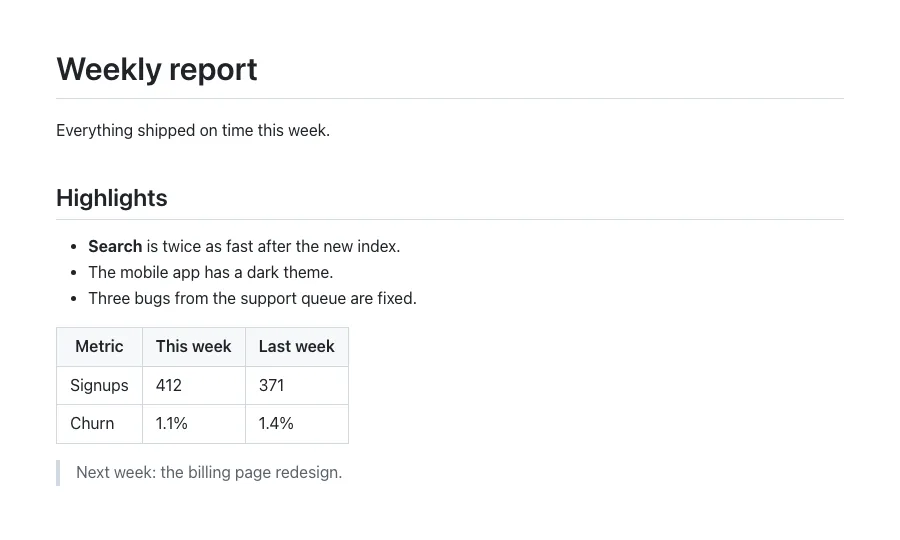
The page uses a neutral document style: dark text on white, a centred column, and styled tables and code blocks. Tables, task lists and fenced code blocks are supported.
A few things to know:
- Add
dark_mode=truefor light text on a dark background. - Add
stylesto change fonts or colours with your own CSS. - Images in the Markdown need full
https://addresses, for the same reason as in HTML. - With
format=pdfyou get a document with real pages.
#Size limit
html and markdown can each be up to 2 MB. A larger value is refused before any rendering starts, with invalid_options or content_too_large.
If you are near the limit, the cause is usually images written into the HTML as data: addresses. Host them somewhere and link to them.
#Where to go next
- How to generate Open Graph images from HTML: the full workflow, with caching.
- PDF rendering: paper size and margins for documents.
- Capturing an element: crop the result to one element.
- Caching: avoid rendering the same card twice.