Ruby examples
Runnable Ruby samples for screenshots, HTML input, JSON answers, retries, signed links and background jobs, using net/http and openssl.
Save this as basic.rb and run it with ruby basic.rb. It uses only what ships with Ruby.
require "json"
require "net/http"

uri = URI("https://curlshot.com/api/v1/screenshot")
uri.query = URI.encode_www_form(access_key: "YOUR_ACCESS_KEY", url: "https://example.com")

response = Net::HTTP.get_response(uri)
abort JSON.parse(response.body)["error_message"] unless response.is_a?(Net::HTTPSuccess)

File.binwrite("example.png", response.body)
puts "Saved example.png"Saved example.png
Every sample on this page is a complete file. They work on Ruby 2.6 and newer.
URI.encode_www_form encodes the values for you. So you can write the page address as it is, even when it contains & or ?.
#Add options
Each option is one more entry in the hash. Here the access key goes in the X-Access-Key header, which keeps it out of the address.
require "json"
require "net/http"

uri = URI("https://curlshot.com/api/v1/screenshot")
uri.query = URI.encode_www_form(
  url: "https://en.wikipedia.org/wiki/Eiffel_Tower",
  viewport_device: "iphone_15_pro",
  full_page: "true",
  block_cookie_banners: "true",
  format: "jpeg",
  image_quality: 85
)

request = Net::HTTP::Get.new(uri)
request["X-Access-Key"] = "YOUR_ACCESS_KEY"

response = Net::HTTP.start(uri.host, uri.port, use_ssl: uri.scheme == "https", read_timeout: 120) do |http|
  http.request(request)
end
abort JSON.parse(response.body)["error_message"] unless response.is_a?(Net::HTTPSuccess)

File.binwrite("eiffel.jpg", response.body)
puts "Saved eiffel.jpg"Saved eiffel.jpg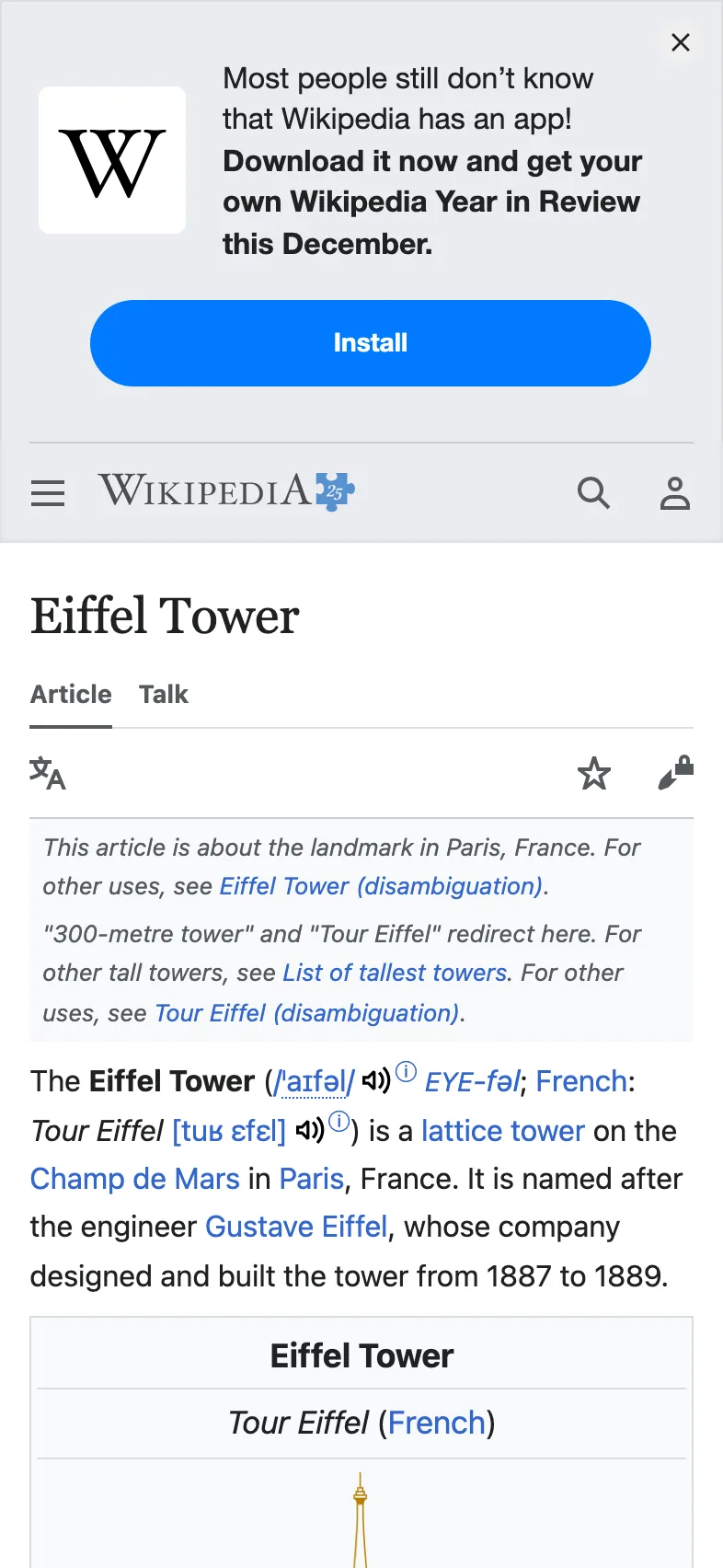
read_timeout is how long your own code waits for an answer, in seconds. The API's own timeout option can be as long as 90 seconds, so give your code more than that.
Option names must match exactly. An unknown name, such as fullpage for full_page, is rejected with invalid_options and a hint. Every option is explained in the options reference.
#Render your own HTML with POST
To turn your own HTML into an image, send the options as a JSON body in a POST request. See HTML and Markdown input.
require "json"
require "net/http"

html = <<~HTML
  <body style="margin:0;display:grid;place-items:center;height:100vh;
               font:700 64px sans-serif;background:#0f172a;color:#fff">
    Hello from HTML
  </body>
HTML

uri = URI("https://curlshot.com/api/v1/screenshot")

# In a JSON body, booleans and numbers are real values, not text.
body = JSON.generate(html: html, viewport_width: 1200, viewport_height: 630, format: "png")
headers = { "X-Access-Key" => "YOUR_ACCESS_KEY", "Content-Type" => "application/json" }

response = Net::HTTP.start(uri.host, uri.port, use_ssl: uri.scheme == "https", read_timeout: 120) do |http|
  http.post(uri.path, body, headers)
end
abort JSON.parse(response.body)["error_message"] unless response.is_a?(Net::HTTPSuccess)

File.binwrite("card.png", response.body)
puts "Saved card.png"Saved card.pngYou get card.png, 1200 by 630 pixels: white text centered on a dark background.
#Get JSON instead of the file
With response_type=json the answer is a small JSON document: details about the render and a link to the stored file.
require "json"
require "net/http"

uri = URI("https://curlshot.com/api/v1/screenshot")
uri.query = URI.encode_www_form(url: "https://news.ycombinator.com", response_type: "json")

request = Net::HTTP::Get.new(uri)
request["X-Access-Key"] = "YOUR_ACCESS_KEY"

response = Net::HTTP.start(uri.host, uri.port, use_ssl: uri.scheme == "https", read_timeout: 120) do |http|
  http.request(request)
end
result = JSON.parse(response.body)
abort result["error_message"] unless response.is_a?(Net::HTTPSuccess)

result.each { |name, value| puts "#{name}: #{value}" }id: a187741109b34d6c991bdab9b2c5da03
url: https://curlshot.com/api/v1/files/a187741109b34d6c991bdab9b2c5da03.png?expires=1791155483&token=wr0Y6nTqXC-yLpWGbch_RVMyZqjGaUgnu2Eeq-shclg
format: png
width: 1280
height: 1024
bytes: 265066
render_ms: 1464
cached: false
expires_at: 2026-10-04T23:11:23.563ZThe url needs no access key, so you can hand it to a browser or to another service. It stops working at the time in expires_at, so download the file before then if you need to keep it.
#Handle errors and retry
A failed request returns JSON with an error_code and an error_message, not an image. Some codes are temporary and worth a second try. The rest fail the same way until you change the request. This helper retries the temporary ones and waits a little longer each time.
require "json"
require "net/http"

API = URI("https://curlshot.com/api/v1/screenshot")
ACCESS_KEY = "YOUR_ACCESS_KEY"

# Temporary problems. Everything else needs a change to the request.
RETRYABLE = %w[
  renderer_busy
  renderer_unavailable
  service_unavailable
  internal_error
  timeout
  navigation_failed
  rate_limited
  concurrency_limit
].freeze

class ScreenshotError < StandardError
  attr_reader :status, :code

  def initialize(status, code, message)
    super("#{code}: #{message}")
    @status = status
    @code = code
  end
end

def take_screenshot(options, tries: 4)
  uri = API.dup
  uri.query = URI.encode_www_form(options)

  (1..tries).each do |attempt|
    request = Net::HTTP::Get.new(uri)
    request["X-Access-Key"] = ACCESS_KEY

    response = Net::HTTP.start(uri.host, uri.port, use_ssl: uri.scheme == "https", read_timeout: 120) do |http|
      http.request(request)
    end
    return response.body if response.is_a?(Net::HTTPSuccess)

    begin
      body = JSON.parse(response.body)
      error = ScreenshotError.new(response.code.to_i, body.fetch("error_code"), body["error_message"])
    rescue JSON::ParserError, KeyError
      # The body is not the JSON we expect. Treat it as a temporary failure.
      error = ScreenshotError.new(response.code.to_i, "internal_error", "Unexpected answer")
    end

    raise error if !RETRYABLE.include?(error.code) || attempt == tries

    # Use Retry-After when the API sends it. Otherwise wait 1, 2, 4 seconds.
    seconds = response["Retry-After"].to_i
    seconds = 2**(attempt - 1) if seconds.zero?
    warn "Attempt #{attempt} failed (#{error.code}). Waiting #{seconds}s."
    sleep seconds
  end
end

begin
  image = take_screenshot(url: "https://github.com/microsoft/playwright")
  File.binwrite("playwright.png", image)
  puts "Saved playwright.png"
rescue ScreenshotError => e
  abort "Gave up: #{e.message}"
endAttempt 1 failed (renderer_busy). Waiting 1s.
Saved playwright.pngGave up: invalid_options: url: must be a full URL starting with http:// or https://When the API knows how long to wait, it says so in the Retry-After header, in seconds. The errors page lists every code and says which ones can be retried.
#Create a signed link
A signed link is a screenshot address with a signature at the end. It is safe to show in a web page, because nobody can change it without your secret key. Build it on your server.
The signature is an HMAC-SHA256, a checksum made with your secret key, of the sorted and encoded parameters.
require "erb"
require "openssl"

def signed_link(endpoint, params, secret_key)
  # Every parameter, sorted by name, then by value.
  pairs = params.map { |name, value| [name.to_s, value.to_s] }.sort

  # ERB::Util.url_encode is the strict form: a space becomes %20, not +.
  canonical = pairs
    .map { |name, value| "#{ERB::Util.url_encode(name)}=#{ERB::Util.url_encode(value)}" }
    .join("&")

  signature = OpenSSL::HMAC.hexdigest("SHA256", secret_key, canonical)
  "#{endpoint}?#{canonical}&signature=#{signature}"
end

link = signed_link(
  "https://curlshot.com/api/v1/screenshot",
  {
    access_key: "YOUR_ACCESS_KEY",
    url: "https://en.wikipedia.org/wiki/Eiffel_Tower",
    format: "webp",
    viewport_width: 1280,
    cache: "true",
    # Optional: the link stops working at this time, in Unix seconds. Here: one hour from now.
    expires: Time.now.to_i + 3600,
  },
  "YOUR_SECRET_KEY"
)

puts linkhttps://curlshot.com/api/v1/screenshot?access_key=YOUR_ACCESS_KEY&cache=true&expires=1791159083&format=webp&url=https%3A%2F%2Fen.wikipedia.org%2Fwiki%2FEiffel_Tower&viewport_width=1280&signature=6c5f73bd40f701699781ec1faf569d8c164f5936c823d1c2a293fa1ff9170e7eexpires is optional. It is a Unix time, the number of seconds since 1970. The link works until that time and never after: the API then answers 403 request_expired. It is part of the signed text, so nobody can move it. Leave it out for a link that never expires.
To test your signing code, keep the placeholder keys and leave out expires. The signature must then be b565e2249494a979e38a79a4c9556b316ff64f15df96febf44c69b9709a52213.
#Run a render in the background and poll
With async=true the API answers at once with a job, and the render runs in the background. You then poll: ask the job address every two seconds until the job is done or failed. More on this in Async and webhooks.
require "json"
require "net/http"

ACCESS_KEY = "YOUR_ACCESS_KEY"

# Small helper: GET an address and return the response.
# The access key is sent only when we talk to the API itself.
def http_get(uri, with_key: true)
  request = Net::HTTP::Get.new(uri)
  request["X-Access-Key"] = ACCESS_KEY if with_key
  Net::HTTP.start(uri.host, uri.port, use_ssl: uri.scheme == "https", read_timeout: 120) do |http|
    http.request(request)
  end
end

# 1. Start the job.
uri = URI("https://curlshot.com/api/v1/screenshot")
uri.query = URI.encode_www_form(
  url: "https://en.wikipedia.org/wiki/Eiffel_Tower",
  full_page: "true",
  async: "true"
)
response = http_get(uri)
started = JSON.parse(response.body)
abort started["error_message"] unless response.is_a?(Net::HTTPSuccess)
puts "Started #{started["job_id"]}"

# 2. Ask every two seconds until the job is done or has failed. Give up after two minutes.
job = nil
60.times do
  sleep 2
  response = http_get(URI(started["job_url"]))
  job = JSON.parse(response.body)
  abort job["error_message"] unless response.is_a?(Net::HTTPSuccess)
  puts "Status: #{job["status"]}"
  break if %w[done failed].include?(job["status"])
end

abort "The job did not finish in time" unless job && %w[done failed].include?(job["status"])
abort "#{job["error_code"]}: #{job["error_message"]}" if job["status"] == "failed"

# 3. Download the finished file from the link in the job.
file = http_get(URI(job["screenshot"]["url"]), with_key: false)
abort "Could not download the file" unless file.is_a?(Net::HTTPSuccess)
File.binwrite("eiffel-full.png", file.body)
puts "Saved eiffel-full.png, #{job["screenshot"]["bytes"]} bytes"Started job_917e1044a2a8885401dae084
Status: processing
Status: done
Saved eiffel-full.png, 7373357 bytes
A finished job holds the result in screenshot, which is null until then. A failed job holds an error_code and an error_message instead.
Asking for the status does not use your quota. The file link in screenshot.url needs no access key and works until the job's screenshot.expires_at.
#Where to go next
- Options reference: every option you can put in the hash.
- Errors: every error code with its cause and fix.
- Signed links: the signing steps explained one by one.
- Async and webhooks: get a call when the job ends, with no polling.
- cURL examples: the same tasks from the terminal.