A screenshot API that is one HTTP request
CurlShot is a website screenshot API. Send one HTTP request with the address of a page and get back a PNG, JPEG, WebP or PDF of it. It renders in a real browser, captures full pages, emulates phones and tablets, hides cookie banners and ads, and works from any language because it is a plain URL. There is a free plan, an OpenAPI description and an MCP server for AI agents.
No address handy? Try
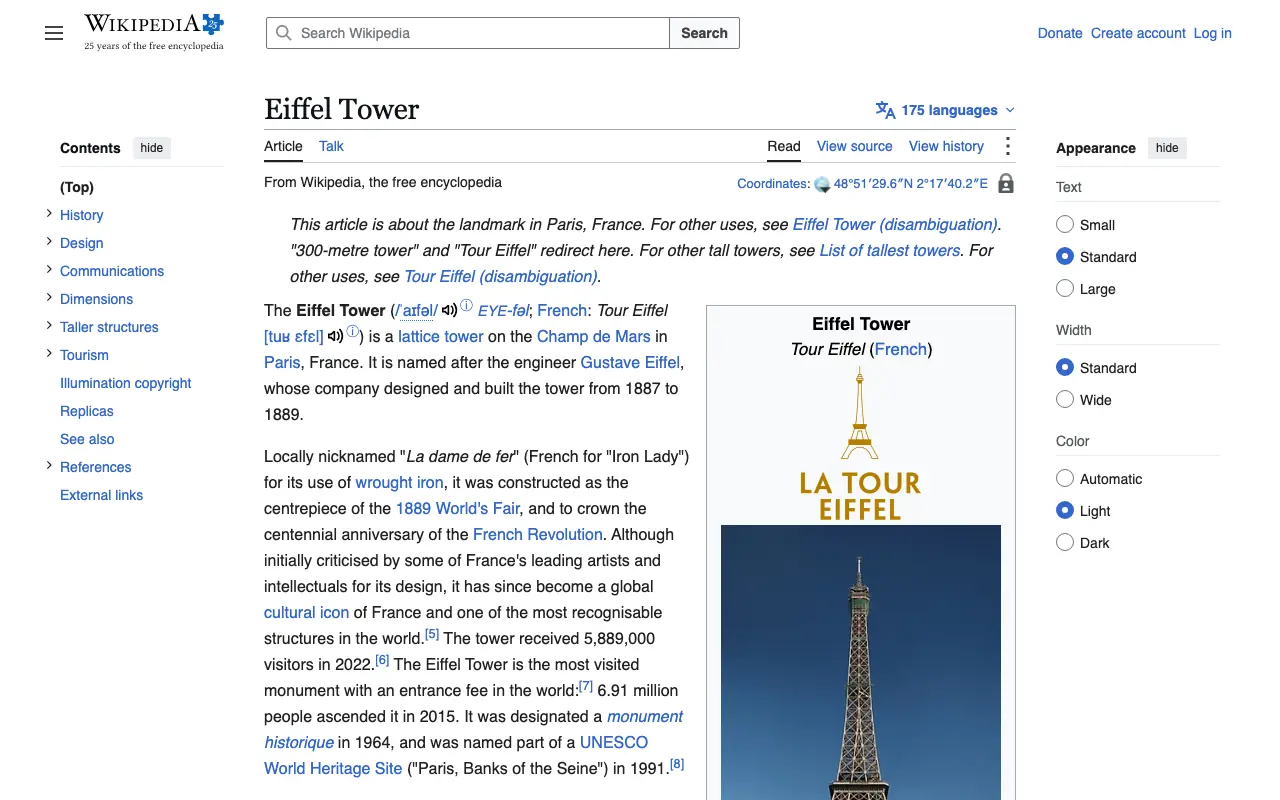
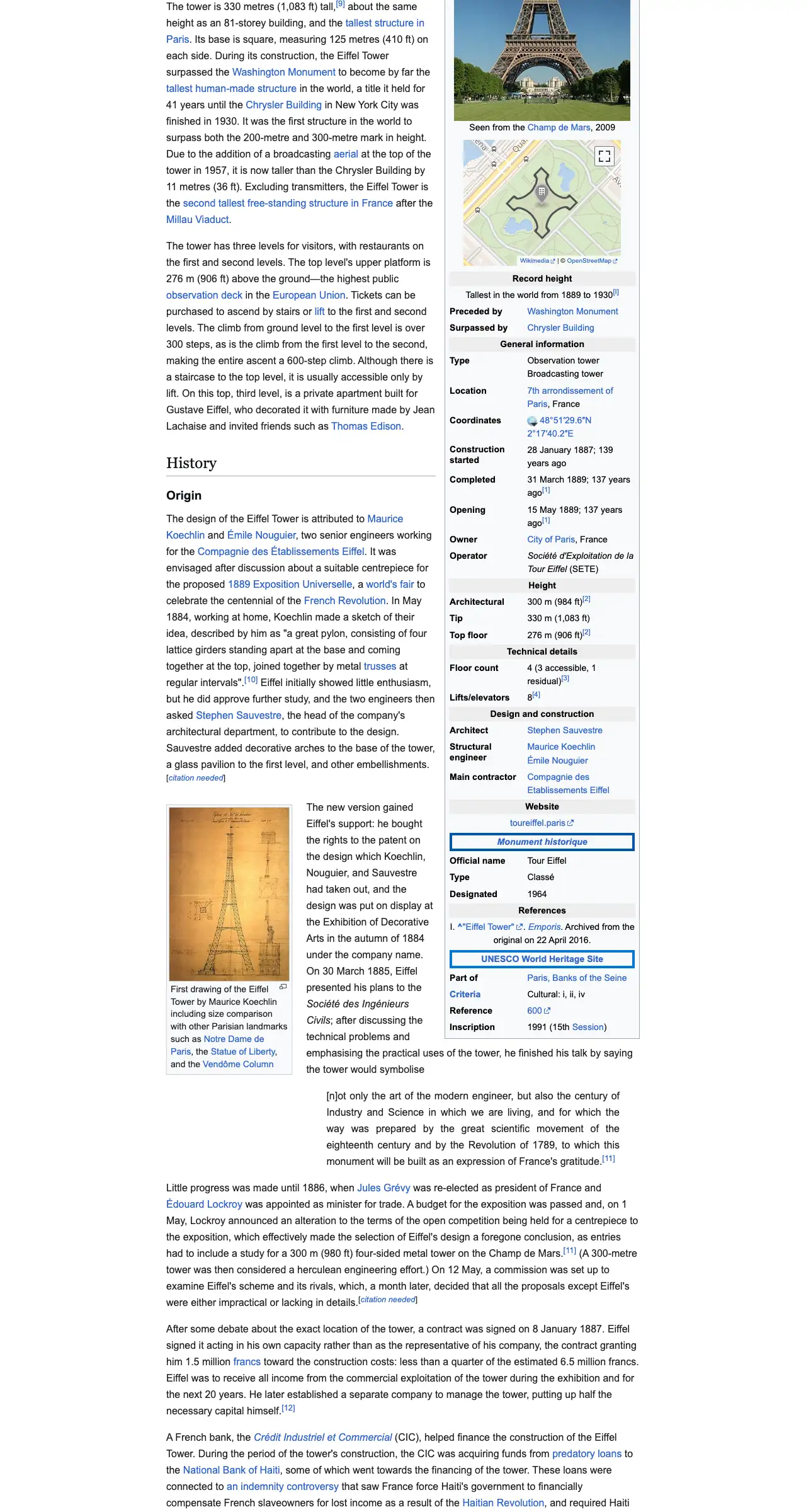
The example stops here. The real page goes on.
This is an example: wikipedia.org on a computer, whole page, a screenshot made with CurlShot. Paste an address above to make your own.
Ads and cookie pop-ups hidden. This page has none, so the screenshot is the same either way.
No account needed to try it. A free account gives you 100 screenshots a month, no card needed.
Create a free accountHow to use the screenshot API in three steps
- 1
Create a free account and copy your access key.
- 2
Build the request: the screenshot address, your key, and the URL of the page.
- 3
Fetch it and save what comes back. Add options as more words in the address.
The same request in six languages
Every sample below takes a full-page screenshot of example.com with the cookie banner hidden, checks the status before it writes anything, and saves example.png. Each one is a complete file with no package to install beyond the HTTP client most projects already have. The access key is read from the SCREENSHOT_ACCESS_KEY environment variable and sent in the X-Access-Key header, which keeps it out of URLs and server logs.
A failed request returns JSON with an error_code and an error_message instead of an image, so check the status first: otherwise the error ends up in a file called example.png that will not open. The samples print X-Quota-Remaining, the screenshots you have left this month, which every answer carries.
- Give your HTTP client a timeout longer than the API's own: a slow page may take up to 90 seconds when you raise the timeout option, so the samples wait 120.
- Every option is one more parameter. In a POST request the same options go in a JSON body, with real booleans and numbers.
- The docs have longer versions of each sample: retries with backoff, signed links, and background jobs that you poll.
status=$(curl -s -G "https://curlshot.com/api/v1/screenshot" \
  -H "X-Access-Key: $SCREENSHOT_ACCESS_KEY" \
  --data-urlencode "url=https://example.com" \
  -d "full_page=true" \
  -d "block_cookie_banners=true" \
  -o example.png -w '%{http_code}')

if [ "$status" != "200" ]; then
  cat example.png   # the JSON error: error_code and error_message
  rm example.png
  exit 1
fi
echo "Saved example.png"// screenshot.mjs - Node.js 18 or newer, no packages.
import { writeFile } from 'node:fs/promises'
const params = new URLSearchParams({
url: 'https://example.com',
full_page: 'true',
block_cookie_banners: 'true',
})
const response = await fetch('https://curlshot.com/api/v1/screenshot?' + params, {
headers: { 'X-Access-Key': process.env.SCREENSHOT_ACCESS_KEY },
})
if (!response.ok) {
const error = await response.json()
throw new Error(error.error_code + ': ' + error.error_message)
}
await writeFile('example.png', Buffer.from(await response.arrayBuffer()))
console.log('Saved example.png,', response.headers.get('x-quota-remaining'), 'screenshots left')# screenshot.py - pip install requests
import os
import requests
response = requests.get(
"https://curlshot.com/api/v1/screenshot",
headers={"X-Access-Key": os.environ["SCREENSHOT_ACCESS_KEY"]},
params={
"url": "https://example.com",
"full_page": "true",
"block_cookie_banners": "true",
},
timeout=120,
)
if not response.ok:
error = response.json()
raise SystemExit(f"{error['error_code']}: {error['error_message']}")
with open("example.png", "wb") as f:
f.write(response.content)
print("Saved example.png,", response.headers["X-Quota-Remaining"], "screenshots left")<?php
// screenshot.php - needs the curl extension.
$query = http_build_query([
'url' => 'https://example.com',
'full_page' => 'true',
'block_cookie_banners' => 'true',
]);
$ch = curl_init('https://curlshot.com/api/v1/screenshot?' . $query);
curl_setopt_array($ch, [
CURLOPT_RETURNTRANSFER => true,
CURLOPT_TIMEOUT => 120,
CURLOPT_HTTPHEADER => ['X-Access-Key: ' . getenv('SCREENSHOT_ACCESS_KEY')],
]);
$body = curl_exec($ch);
$status = curl_getinfo($ch, CURLINFO_RESPONSE_CODE);
if ($body === false) {
exit('Connection failed: ' . curl_error($ch) . "\n");
}
if ($status !== 200) {
$error = json_decode($body, true);
exit($error['error_code'] . ': ' . $error['error_message'] . "\n");
}
file_put_contents('example.png', $body);
echo "Saved example.png\n";// main.go - standard library only: go run main.go
package main
import (
"fmt"
"io"
"log"
"net/http"
"net/url"
"os"
"time"
)
func main() {
params := url.Values{}
params.Set("url", "https://example.com")
params.Set("full_page", "true")
params.Set("block_cookie_banners", "true")
req, err := http.NewRequest("GET", "https://curlshot.com/api/v1/screenshot?"+params.Encode(), nil)
if err != nil {
log.Fatal(err)
}
req.Header.Set("X-Access-Key", os.Getenv("SCREENSHOT_ACCESS_KEY"))
client := &http.Client{Timeout: 120 * time.Second}
resp, err := client.Do(req)
if err != nil {
log.Fatal(err)
}
defer resp.Body.Close()
body, err := io.ReadAll(resp.Body)
if err != nil {
log.Fatal(err)
}
if resp.StatusCode != http.StatusOK {
log.Fatalf("status %d: %s", resp.StatusCode, body)
}
if err := os.WriteFile("example.png", body, 0o644); err != nil {
log.Fatal(err)
}
fmt.Println("Saved example.png,", resp.Header.Get("X-Quota-Remaining"), "screenshots left")
}# screenshot.rb - standard library only: ruby screenshot.rb
require "json"
require "net/http"
uri = URI("https://curlshot.com/api/v1/screenshot")
uri.query = URI.encode_www_form(
url: "https://example.com",
full_page: "true",
block_cookie_banners: "true"
)
request = Net::HTTP::Get.new(uri)
request["X-Access-Key"] = ENV.fetch("SCREENSHOT_ACCESS_KEY")
response = Net::HTTP.start(uri.host, uri.port, use_ssl: uri.scheme == "https", read_timeout: 120) do |http|
http.request(request)
end
unless response.is_a?(Net::HTTPSuccess)
error = JSON.parse(response.body)
abort "#{error["error_code"]}: #{error["error_message"]}"
end
File.binwrite("example.png", response.body)
puts "Saved example.png, #{response["X-Quota-Remaining"]} screenshots left"Everything one request can do
The API is one endpoint with 69 options, in 13 groups. Every option works the same in a GET query string and in a POST JSON body, and a misspelled option is never silently ignored: the answer names the option you probably meant.
Show the table (13 rows)
| Group | What it controls | Options | For example |
|---|---|---|---|
| Source | What to render. Exactly one is required. | 3 | url, html, markdown |
| Output | File format, quality and size of the result. | 6 | format, image_quality, image_width |
| Viewport | The browser window the page is rendered in. | 6 | viewport_width, viewport_height, device_scale_factor |
| Capture | Which part of the page ends up in the image. | 8 | full_page, full_page_scroll, full_page_max_height |
| Waiting | When the page counts as ready. | 4 | wait_until, delay, timeout |
| Customize | Change how the page looks before the capture. | 7 | dark_mode, reduced_motion, media_type |
| Request | What the browser sends to the site. | 5 | user_agent, headers, cookies |
| Blocking | Remove ads, banners and other noise. | 6 | block_ads, block_trackers, block_cookie_banners |
| Options that apply when format is pdf. | 9 | pdf_paper_format, pdf_landscape, pdf_print_background | |
| Video | Options that apply when format is mp4, webm or gif. | 6 | video_duration, video_max_duration, video_fps |
| Cache | Reuse a previous render instead of rendering again. | 3 | cache, cache_ttl, cache_key |
| Async and webhooks | Render in the background. | 3 | async, webhook_url, webhook_sign |
| Authentication | Who is making the request. | 3 | access_key, signature, expires |
What comes back
By default the answer is the file itself, with the matching Content-Type: image/png, image/jpeg, image/webp or application/pdf. Add response_type=json and you get a short JSON document instead, with a link to the stored file, its size and how long the render took. The link needs no access key, so you can hand it to a browser, a queue or another service; it stops working at the time in expires_at.
Every answer, file or JSON, carries headers that tell your code where it stands, so you never need a second call to find out how much of the month is left.
Show the table (8 rows)
| Header | What it tells you |
|---|---|
| X-Quota-Remaining | Screenshots left this period, bonus screenshots included |
| X-Quota-Reset | When the period starts again, as an ISO date |
| X-RateLimit-Remaining | Requests left in the current minute |
| X-Concurrency-Remaining | Render slots free right now |
| X-Cache | HIT for a stored copy that did not count, MISS for a new render |
| X-Render-Ms | How long the render took, in milliseconds |
| X-Reference-Id | The id of the request, to quote when you ask for help |
| Retry-After | On 429 and 503 only: seconds to wait before the next try |
- An error is JSON too: error_code for your code, error_message for people, and documentation_url pointing at the fix.
- Temporary errors (a busy renderer, a page that timed out, a rate limit) are worth a retry. The rest fail the same way until the request changes.
{
  "id": "a187741109b34d6c991bdab9b2c5da03",
  "url": "https://curlshot.com/api/v1/files/a187741109b34d6c991bdab9b2c5da03.png?expires=1791155483&token=...",
  "format": "png",
  "width": 1280,
  "height": 1024,
  "bytes": 265066,
  "render_ms": 1464,
  "cached": false,
  "expires_at": "2026-10-04T23:11:23.563Z"
}How to choose a screenshot API
Most screenshot APIs can capture example.com. They differ on the pages that are hard to capture, on what they count, and on how much of the work they leave to you. These are the questions worth asking before you write the integration, with the answers for this one.
Show the table (11 rows)
| Ask | Why it matters | Here |
|---|---|---|
| Does it render in a real browser? | Pages built with JavaScript come out blank or broken in anything less | Yes: Chromium, with JavaScript, web fonts and modern CSS |
| Does a full-page capture load lazy images? | Many pages load images only when you scroll, which leaves blank bands | Yes: the page is scrolled first (full_page_scroll, on by default) |
| Can it remove cookie banners and ads? | In much of the world a consent pop-up covers the first screen | Yes: block_cookie_banners, block_ads, block_trackers, block_chats, plus hide_selectors for the rest |
| What counts as a screenshot? | Paying for failures and repeats inflates the real price | One successful render. Failed renders and cache hits are free |
| What happens at the end of the quota? | A surprise bill is worse than a refused request | A clear 402 answer; nothing is charged on top unless you opt in |
| Is there a free plan, or only a trial? | You want to build the integration before you pay | A free plan every month, no card |
| Can it render your own HTML? | Social cards, invoices and reports start as templates, not URLs | Yes: html or markdown in a POST body |
| Can it work in the background? | Long pages and big batches should not hold a request open | async=true with a signed webhook, and bulk calls of up to 100 |
| Can the key go in a web page? | An exposed key can be used by anyone | Signed links, and keys that can require a signature |
| Is it safe to pass user-supplied URLs? | A browser pointed at your network is a security hole | Private and local addresses are refused, redirects included |
| Can agents and code generators use it? | Less glue code for you to write | OpenAPI description, MCP server, llms.txt |
- Test each candidate on your three hardest pages, not on a demo page. A screenshot API is only as good as its worst capture of the pages you care about.
- Read the error responses as well as the happy path. Clear error codes and a Retry-After header save more time than any feature list.
A screenshot API or your own headless browser
Puppeteer or Playwright on your own server can take the same screenshot in a few lines. The code is the easy part; the server is not. A headless browser needs memory limits and restarts, fonts for every script, a queue, timeouts, a cookie-banner list that someone keeps current, checks that stop it from opening addresses on your own network, and Chromium updates that may change how pages render.
An API moves that work off your servers and replaces it with a monthly price. Your own browser stays the better choice for long scripted sessions, pages that only your network can reach, or a volume so steady and so large that a dedicated server costs less.
- Already have a Puppeteer or Playwright script? Most calls map one to one onto an option: setViewport to viewport_width, fullPage to full_page, waitForSelector to wait_for_selector.
- The page next door puts the two side by side, with the code.
Limits at a glance
The limits of a single request. Your plan sets the monthly allowance, the rate per minute and how many renders run at once.
Show the table (9 rows)
| What | Limit |
|---|---|
| Time for the page to load (timeout) | 1 to 90 seconds, default 30 |
| Extra wait after loading (delay) | Up to 30 seconds |
| Browser window | 100 to 3,840 px wide, 100 to 4,320 px tall |
| Pixel density | 1 to 3 |
| Full-page height | 20,000 px by default, up to 30,000 px |
| HTML or Markdown input | Up to 2 MB |
| Cache lifetime | 60 seconds to 30 days, default 4 hours |
| Scrolling video | 1 to 30 seconds |
| Bulk call | Up to 100 requests, on plans that include bulk |
Screenshot API pricing per 1,000 screenshots
Screenshot APIs are priced as a monthly plan with a fixed number of screenshots, so the fair way to compare them is the price of 1,000. The table takes the cheapest and the largest self-serve monthly plan of each product and divides the price by the screenshots it includes. Prices are in US dollars, billed monthly, before tax.
CurlShot's row comes from its live plans. The other rows were read on each product's own pricing page on 2026-11-09; the comparison pages below link those sources, show the date of each reading and put the features side by side. Some of those products bill by images, requests or hits rather than screenshots, so read the rows as a guide, not an exact match.
Price per 1,000 is not the whole cost. Check what counts as a screenshot (a failed render, a cache hit, a page of a PDF), whether the cheapest plan captures every site in full quality, and what happens at the end of the quota: a hard stop, or a bill.
Show the table (9 rows)
| Product | Cheapest plan a month | Per 1,000 | Largest self-serve plan | Per 1,000 at that size |
|---|---|---|---|---|
| CurlShot | $19 for 3,000 | $6.33 | $249 for 60,000 | $4.15 |
| Urlbox | $19 for 2,000 | $9.50 | $99 for 15,000 | $6.60 |
| ScreenshotOne | $17 for 2,000 | $8.50 | $259 for 50,000 | $5.18 |
| ApiFlash | $7 for 1,000 | $7.00 | $180 for 100,000 | $1.80 |
| url2png | $29 for 5,000 | $5.80 | $199 for 50,000 | $3.98 |
| ScreenshotAPI.net | $9 for 1,000 | $9.00 | $175 for 100,000 | $1.75 |
| HTML/CSS to Image | $14 for 1,000 | $14.00 | $375 for 100,000 | $3.75 |
| Microlink | $49 for 46,000 | $1.07 | $49 for 46,000 | $1.07 |
| Thum.io | $1 for 5,000 | $0.20 | $20 for 200,000 | $0.10 |
- Before any of these: the free plan here gives 100 screenshots a month without a card, enough to build and test an integration.
- Plans stop at their quota: you never pay more than the price of your plan.
What people use it for
- Full-page and first-screen captures, as PNG, JPEG, WebP or PDF
- Device presets for phones, tablets and laptops
- Blocking of ads, cookie banners, trackers and chat widgets
- Response cache, signed links, async renders with webhooks, bulk requests
- HTML and Markdown input, for images made from your own templates
- An MCP server and an OpenAPI description, for AI agents and generated clients
For developers: one request
The same thing from your own code. It is a plain HTTP request, so it works from any language. Create a free account to get an access key.
curl "https://curlshot.com/api/v1/screenshot?access_key=YOUR_ACCESS_KEY&url=https://example.com&full_page=true&block_cookie_banners=true" \
--output example.pngQuestions people ask
What is a screenshot API?
A service that takes screenshots of web pages for your code. You send the address of a page, it opens the page in a browser on its own servers and returns the image, so you do not run or maintain headless browsers yourself.
Is there a free screenshot API?
Yes. A free CurlShot account includes 100 screenshots a month, with no card and no watermark. It uses the same endpoint and options as the paid plans, so code written on the free plan keeps working after an upgrade.
How much does a screenshot API cost?
Here, paid plans start at $19 a month for 3,000 screenshots, which is $6.33 per 1,000. The price per 1,000 falls as plans grow: the Scale plan works out at $4.15. The table on this page compares that with other screenshot APIs.
Which languages does it work with?
Any language that can fetch a URL. This page has complete samples for cURL, Node.js, Python, PHP, Go and Ruby, and the docs have longer ones. There is no SDK to install.
How is usage counted?
One successful render is one screenshot, whatever its size: a full-page capture or a 30-page PDF counts the same as a thumbnail. Failed renders and cache hits are not counted. Each plan is a fixed number of screenshots a month for a fixed price.
Can I show a screenshot from the API directly in a web page?
Yes, with a signed link: the screenshot address plus a signature made on your server with your secret key. Nobody can change the page or the options in it, so the access key inside it cannot be reused for anything else.
Can it capture pages behind a login?
Yes, when you send what the page needs: its session cookie, extra request headers or an Authorization header, which goes to the target site only. Local and private network addresses are refused on purpose; for those, send the HTML instead.
Can an AI agent use it?
Yes. CurlShot has an MCP server with a take_screenshot tool, an OpenAPI description and an llms.txt file, so an agent can look at any web page.
Guides that go deeper
- ComparisonScreenshot API comparison: prices and free plansUrlbox, ScreenshotOne, ApiFlash, ScreenshotAPI.net and ScreenshotMachine side by side: free plans, price at 10,000 a month, formats, MCP and storage.
- Buyer’s guideFree screenshot APIs: what the free plans includeThe free plans and trials of seven screenshot services, what 100 free screenshots a month covers, how to stretch it, and when paying makes sense.
- CalculatorScreenshot API vs headless browser: the real costA cost calculator with every assumption editable, the hidden work behind headless Chrome, and an honest checklist for build or buy.
- Rosetta stoneWebsite screenshot code examples in 8 languagesThe shortest working code to save a full-page screenshot of a website in curl, Node.js, Python, PHP, Go, Ruby, Java and C#, side by side.
- Error dictionary15 curl errors on a screenshot call, with fixes15 curl errors from real runs of a screenshot call: the exact message, what it means, how to check it and the fix. Paste yours to look it up.
- GuideVisual regression testing, explained in picturesHow screenshot comparison works, why visual tests go flaky and how to fix each cause, the tools, and a set-up checklist with a Playwright example.
- GlossaryWeb capture glossary: 63 screenshot terms, A to Z63 screenshot, rendering and web capture terms, each defined in one or two sentences with a source, an example and the terms it connects to.
- CI workflowScreenshot every pull request in GitHub ActionsBuild a GitHub Actions workflow that screenshots your pull request preview on every push: pages, widths and format, retries, and a plan size.
- EstimatorHow much storage do daily screenshots take?Measured sizes of 7 real pages as PNG, JPEG and WebP at 4 widths, plus an estimator: GB a month, a year and held, with and without dedupe.
Related tools
- Free screenshot APIA free screenshot API plan with a monthly allowance and no card: the same endpoint and options as the paid plans. What it includes, its limits, when to upgrade.
- Puppeteer screenshot APIYour Puppeteer or Playwright screenshot script as one HTTP request: the same capture without running Chromium. Code side by side, and when to keep your own.
- HTML to imageRender your own HTML, CSS or Markdown into an image or a PDF with one API request. For social cards, certificates, receipts and reports.
- Full-page screenshotTake a screenshot of a whole web page, from the top to the very bottom, as one image. Paste the address, nothing to install. Also available as an API.
- Web page to PDFTurn a web page into a PDF document from its address. Real pages, working links and selectable text. Paste the address, nothing to install. Also an API.
- URL to PDF APIA URL to PDF API for developers: send a page address with format=pdf, get a PDF back. Paper size, margins, print styles, webhooks and signed links.