cURL examples
Copy-and-paste cURL commands and shell scripts for screenshots, HTML input, JSON answers, retries, signed links and background jobs.
This is the shortest working request. Swap YOUR_ACCESS_KEY for your own access key and paste it into a terminal.
curl "https://curlshot.com/api/v1/screenshot?access_key=YOUR_ACCESS_KEY&url=https://example.com" \
  --output example.png
You get a file called example.png next to where you ran the command.
Every sample on this page can be pasted as it is. The scripts also need jq, a small tool that reads JSON in the terminal, and openssl, which most systems already have.
#Add options
Each option is one more -d line. -G sends them all as a query string, and --data-urlencode encodes the page address for you, so you can write it as it is. Here the access key goes in the X-Access-Key header, which keeps it out of the address.
curl -G "https://curlshot.com/api/v1/screenshot" \
  -H "X-Access-Key: YOUR_ACCESS_KEY" \
  --data-urlencode "url=https://en.wikipedia.org/wiki/Eiffel_Tower" \
  -d "viewport_device=iphone_15_pro" \
  -d "full_page=true" \
  -d "block_cookie_banners=true" \
  -d "format=jpeg" \
  -d "image_quality=85" \
  --output eiffel.jpg
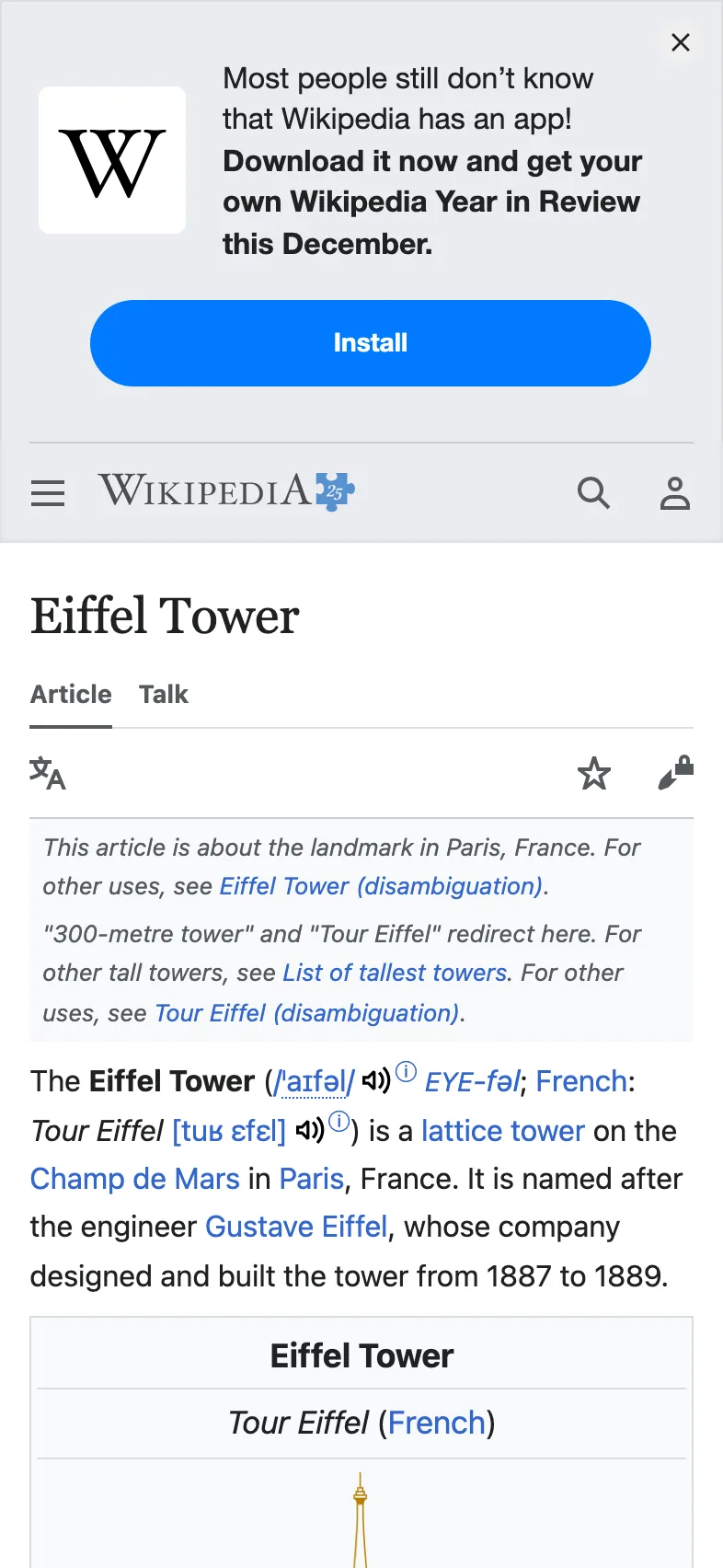
You get eiffel.jpg: the whole article as an iPhone 15 Pro shows it, without the cookie banner.
Option names must match exactly. An unknown name, such as fullpage for full_page, is rejected with invalid_options and a hint. Every option is explained in the options reference.
#Render your own HTML with POST
To turn your own HTML into an image, send the options as a JSON body in a POST request. See HTML and Markdown input.
curl -X POST "https://curlshot.com/api/v1/screenshot" \
  -H "X-Access-Key: YOUR_ACCESS_KEY" \
  -H "Content-Type: application/json" \
  -d '{
    "html": "<body style=\"margin:0;display:grid;place-items:center;height:100vh;font:700 64px sans-serif;background:#0f172a;color:#fff\">Hello from HTML</body>",
    "viewport_width": 1200,
    "viewport_height": 630,
    "format": "png"
  }' \
  --output card.png
You get card.png, 1200 by 630 pixels: white text centered on a dark background.
In a JSON body, booleans and numbers are real values, not text: write them without quotes.
#Get JSON instead of the file
With response_type=json the answer is a small JSON document: details about the render and a link to the stored file.
curl -G "https://curlshot.com/api/v1/screenshot" \
  -H "X-Access-Key: YOUR_ACCESS_KEY" \
  --data-urlencode "url=https://news.ycombinator.com" \
-d "response_type=json"{
"id": "a187741109b34d6c991bdab9b2c5da03",
"url": "https://curlshot.com/api/v1/files/a187741109b34d6c991bdab9b2c5da03.png?expires=1791155483&token=wr0Y6nTqXC-yLpWGbch_RVMyZqjGaUgnu2Eeq-shclg",
"format": "png",
"width": 1280,
"height": 1024,
"bytes": 265066,
"render_ms": 1464,
"cached": false,
"expires_at": "2026-10-04T23:11:23.563Z"
}The url needs no access key, so you can hand it to a browser or to another service. It stops working at the time in expires_at, so download the file before then if you need to keep it.
#Handle errors and retry
A failed request returns JSON with an error_code and an error_message, not an image. Some codes are temporary and worth a second try. The rest fail the same way until you change the request. This script retries the temporary ones and waits a little longer each time.
#!/usr/bin/env bash
# Usage: ./retry.sh "https://example.com" example.png
API="https://curlshot.com/api/v1/screenshot"
ACCESS_KEY="YOUR_ACCESS_KEY"
PAGE_URL="$1"
OUT="$2"
TRIES=4

for attempt in $(seq 1 "$TRIES"); do
  # -o saves the body, -D saves the headers, -w prints only the status code.
  status=$(curl -s -G "$API" \
    -H "X-Access-Key: $ACCESS_KEY" \
    --data-urlencode "url=$PAGE_URL" \
    -o "$OUT" -D headers.txt -w '%{http_code}')

  if [ "$status" = "200" ]; then
    echo "Saved $OUT"
    exit 0
  fi

  # On failure the body is the JSON error. If it is not JSON, treat it as a temporary failure.
  code=$(jq -r '.error_code' "$OUT" 2>/dev/null)
  message=$(jq -r '.error_message' "$OUT" 2>/dev/null)
  code=${code:-internal_error}

  case "$code" in
    # Temporary problems. Everything else needs a change to the request.
    renderer_busy | renderer_unavailable | service_unavailable | internal_error | timeout | navigation_failed | rate_limited | concurrency_limit) ;;
    *) break ;;
  esac
  [ "$attempt" = "$TRIES" ] && break

  # Use Retry-After when the API sends it. Otherwise wait 1, 2, 4 seconds.
  seconds=$(grep -i '^retry-after:' headers.txt | tr -dc '0-9')
  seconds=${seconds:-$((2 ** (attempt - 1)))}
  echo "Attempt $attempt failed ($code). Waiting ${seconds}s." >&2
  sleep "$seconds"
done

echo "Gave up: $code: ${message:-Unexpected answer with status $status}" >&2
rm -f "$OUT"
exit 1Attempt 1 failed (renderer_busy). Waiting 1s.
Saved example.pngGave up: invalid_options: url: must be a full URL starting with http:// or https://When the API knows how long to wait, it says so in the Retry-After header, in seconds. The errors page lists every code and says which ones can be retried.
#Create a signed link
A signed link is a screenshot address with a signature at the end. It is safe to show in a web page, because nobody can change it without your secret key. Build it on your server.
The signature is an HMAC-SHA256, a checksum made with your secret key, of the sorted and encoded parameters.
#!/usr/bin/env bash
API="https://curlshot.com/api/v1/screenshot"
ACCESS_KEY="YOUR_ACCESS_KEY"
SECRET_KEY="YOUR_SECRET_KEY"
PAGE_URL="https://en.wikipedia.org/wiki/Eiffel_Tower"

# Optional: the link stops working at this time, in Unix seconds. Here: one hour from now.
EXPIRES=$(($(date +%s) + 3600))

# Strict percent-encoding: only letters, digits and - _ . ~ stay as they are.
encode() { jq -rn --arg v "$1" '$v | @uri'; }

# Every parameter, sorted by name from a to z, joined with &.
CANONICAL="access_key=$(encode "$ACCESS_KEY")&cache=true&expires=$EXPIRES&format=webp&url=$(encode "$PAGE_URL")&viewport_width=1280"

# HMAC-SHA256 as lowercase hex. openssl prints a label first, so keep the last word.
SIGNATURE=$(printf '%s' "$CANONICAL" | openssl dgst -sha256 -hmac "$SECRET_KEY" -hex | awk '{print $NF}')

echo "$API?$CANONICAL&signature=$SIGNATURE"https://curlshot.com/api/v1/screenshot?access_key=YOUR_ACCESS_KEY&cache=true&expires=1791159083&format=webp&url=https%3A%2F%2Fen.wikipedia.org%2Fwiki%2FEiffel_Tower&viewport_width=1280&signature=6c5f73bd40f701699781ec1faf569d8c164f5936c823d1c2a293fa1ff9170e7eexpires is optional. It is a Unix time, the number of seconds since 1970. The link works until that time and never after: the API then answers 403 request_expired. It is part of the signed text, so nobody can move it. Leave it out for a link that never expires.
To test your signing code, keep the placeholder keys and leave out expires. The signature must then be b565e2249494a979e38a79a4c9556b316ff64f15df96febf44c69b9709a52213.
#Run a render in the background and poll
With async=true the API answers at once with a job, and the render runs in the background. You then poll: ask the job address every two seconds until the job is done or failed. More on this in Async and webhooks.
#!/usr/bin/env bash
API="https://curlshot.com/api/v1/screenshot"
ACCESS_KEY="YOUR_ACCESS_KEY"

# 1. Start the job.
STARTED=$(curl -s -G "$API" \
  -H "X-Access-Key: $ACCESS_KEY" \
  --data-urlencode "url=https://en.wikipedia.org/wiki/Eiffel_Tower" \
  -d "full_page=true" \
  -d "async=true")
JOB_URL=$(echo "$STARTED" | jq -r '.job_url // empty')
if [ -z "$JOB_URL" ]; then
  echo "$STARTED" | jq -r '.error_message' >&2
  exit 1
fi
echo "Started $(echo "$STARTED" | jq -r '.job_id')"

# 2. Ask every two seconds until the job is done or has failed. Give up after two minutes.
STATUS=""
for i in $(seq 1 60); do
  sleep 2
  JOB=$(curl -s "$JOB_URL" -H "X-Access-Key: $ACCESS_KEY")
  STATUS=$(echo "$JOB" | jq -r '.status')
  echo "Status: $STATUS"
  case "$STATUS" in done | failed) break ;; esac
done

if [ "$STATUS" = "failed" ]; then
  echo "$JOB" | jq -r '"\(.error_code): \(.error_message)"' >&2
  exit 1
fi
if [ "$STATUS" != "done" ]; then
  echo "The job did not finish in time" >&2
  exit 1
fi

# 3. Download the finished file from the link in the job.
curl -s "$(echo "$JOB" | jq -r '.screenshot.url')" --output eiffel-full.png
echo "Saved eiffel-full.png, $(echo "$JOB" | jq -r '.screenshot.bytes') bytes"Started job_917e1044a2a8885401dae084
Status: processing
Status: done
Saved eiffel-full.png, 7373357 bytes
A finished job holds the result in screenshot, which is null until then. A failed job holds an error_code and an error_message instead.
Asking for the status does not use your quota. The file link in screenshot.url needs no access key and works until the job's screenshot.expires_at.
#Where to go next
- Options reference: every option you can add with
-d. - Errors: every error code with its cause and fix.
- Signed links: the signing steps explained one by one.
- Async and webhooks: get a call when the job ends, with no polling.
- Node.js examples: the same tasks in JavaScript.