Website to JPG: spot the difference
One web page, drawn as a PNG and as JPEGs from quality 80 down to 10. Below are six crops of the same 180 x 120 pixels. One is the PNG. Click the one you think it is, and the quality and the bytes of every tile come up.
Small text
Round 1: small text
A serif heading and two lines of 14 px grey text, from the left column of the test page.
Look at: The space around the letters. A JPEG puts a faint grey haze next to sharp edges, and the haze grows as the quality drops.
Tile A
Tile B
Tile C
Tile D
Tile E
Tile F
Which tile is the PNG? Click it.
The page the crops come from
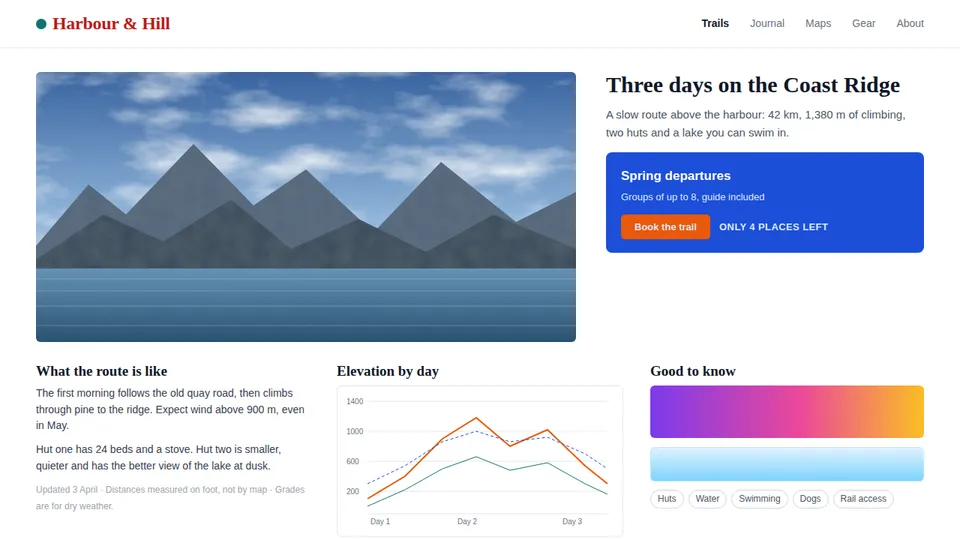
A made-up trail page, 1280 x 720 pixels, built to hold the shapes a JPEG finds hard: a photograph with grain, small text, a button on a coloured panel, and thin chart lines. The photograph is generated, so there is nothing to credit. The page was drawn once as a PNG, then as a JPEG at 12 quality levels.
The PNG is the reference: it is lossless, 429,833 bytes. Next to each tile you will see dB, the PSNR of that crop against the PNG. A higher number is closer to the original, and identical would be infinite. It is a measure, not an eye, so the boards give my reading too.
A photo and a mountain edge
Round 3: a photo and a mountain edge
A mountain peak against a cloudy sky, from the hero picture, which carries fine film grain.
Look at: Two things: the grain in the sky, and square blocks in smooth areas. JPEG throws grain away first and builds blocks last.
Tile A
Tile B
Tile C
Tile D
Tile E
Tile F
Which tile is the PNG? Click it.
Thin coloured lines
Round 4: thin coloured lines
Three 1 and 2 px lines (orange, dashed blue, teal) on a light grid, from the chart card.
Look at: The colour of the thinnest line. A line one pixel wide has almost no colour data of its own, and JPEG keeps colour at half detail.
Tile A
Tile B
Tile C
Tile D
Tile E
Tile F
Which tile is the PNG? Click it.
The answers, all four boards
The same tiles as above with what each one was. The file column is the size of the whole 1280 x 720 page at that quality, not of the crop.
Round 1: small text
| Tile | It was | Page file | dB |
|---|---|---|---|
| A | JPEG, quality 40 | 47,636 | 23.6 |
| B | The PNG | 429,833 | - |
| C | JPEG, quality 10 | 21,003 | 20.9 |
| D | JPEG, quality 80 | 85,076 | 25.8 |
| E | JPEG, quality 20 | 31,894 | 22.3 |
| F | JPEG, quality 60 | 60,324 | 24.6 |
Text is forgiving down to quality 60: at this zoom I could not tell 80 or 60 from the PNG. The first faint haze I saw was at 40, and 20 and 10 are plainly smeared. The crop PSNR falls from 25.8 dB at 80 to 20.9 dB at 10.
Round 2: a button on a coloured panel
| Tile | It was | Page file | dB |
|---|---|---|---|
| A | JPEG, quality 20 | 31,894 | 22.2 |
| B | JPEG, quality 80 | 85,076 | 25.7 |
| C | The PNG | 429,833 | - |
| D | JPEG, quality 10 | 21,003 | 21.4 |
| E | JPEG, quality 60 | 60,324 | 24.6 |
| F | JPEG, quality 40 | 47,636 | 23.9 |
The edge held at 80 and 60. At 40 I saw a faint halo around the button, and at 20 and 10 the orange smudges into the blue and the white label turns noisy. Every file here keeps colour at half detail, even the quality 95 one (see the encoding table below).
Round 3: a photo and a mountain edge
| Tile | It was | Page file | dB |
|---|---|---|---|
| A | JPEG, quality 60 | 60,324 | 38.2 |
| B | JPEG, quality 10 | 21,003 | 30.9 |
| C | JPEG, quality 40 | 47,636 | 36.9 |
| D | The PNG | 429,833 | - |
| E | JPEG, quality 80 | 85,076 | 40.4 |
| F | JPEG, quality 20 | 31,894 | 34.3 |
This is the case JPEG is made for, and the loss is still there: every JPEG in the set smooths the grain, quality 80 included, and that is the only tell between the PNG and 80. Blocks of 8 x 8 pixels show in the sky at 20 and are plain at 10. The crop PSNR stays above 34 dB down to 20.
Round 4: thin coloured lines
| Tile | It was | Page file | dB / colour left |
|---|---|---|---|
| A | The PNG | 429,833 | - |
| B | JPEG, quality 40 | 47,636 | 27.3 / 43% |
| C | JPEG, quality 80 | 85,076 | 30.4 / 58% |
| D | JPEG, quality 20 | 31,894 | 25.7 / 34% |
| E | JPEG, quality 10 | 21,003 | 24.3 / 26% |
| F | JPEG, quality 60 | 60,324 | 28.4 / 48% |
The hardest crop. Already at 80 the teal line is paler and the orange line has a faint halo. At 40 the teal line is nearly grey. The colour column counts how much of the line colour is left, averaged over the 780 pixels where the PNG has a strong colour: 58 percent at 80, 26 percent at 10.
The verdicts are my reading of the crops enlarged three times. At actual size, in a strip of the page next to the PNG, I saw no difference at quality 80 or 40; the first one I saw was at 20, as bands in the purple gradient. Your screen and your eyes will give other lines, which is why the tiles are above and not only a rule.
What each step down saves
The whole page at 12 quality levels. The bar is the file; the number after it is the PSNR, and the PNG is the longest bar.
- PNG429,833 bytes
- JPEG 95167,475 (39%, 34.2 dB)
- JPEG 90120,120 (28%, 33.8 dB)
- JPEG 8598,218 (23%, 33.3 dB)
- JPEG 80default85,076 (20%, 32.9 dB)
- JPEG 7576,395 (18%, 32.5 dB)
- JPEG 7070,494 (16%, 32.2 dB)
- JPEG 6060,324 (14%, 31.5 dB)
- JPEG 5053,996 (13%, 31.0 dB)
- JPEG 4047,636 (11%, 30.5 dB)
- JPEG 3040,573 (9%, 29.9 dB)
- JPEG 2031,894 (7%, 28.8 dB)
- JPEG 1021,003 (5%, 27.2 dB)
The curve bends. From 95 to 80 the file fell 49 percent for 1.3 dB. From 80 to 50 it fell a further 37 percent for 1.9 dB. From 50 to 10 it fell 61 percent more, and the price was 3.8 dB, the step where the boards turn ugly. The top of the ladder is the expensive part: quality 95 cost nearly twice the bytes of 80 and, on the boards, bought nothing I could see.
Playwright documents the same 0 to 100 scale for the browser's own JPEG writer and does not apply it to PNG.[1] The article on PNG, JPEG, WebP or PDF compares the formats; this page only varies the one dial.
The same dial on three pages
The quality number does not mean the same thing on every page. Bytes at the same 1280 x 720 size:
| Page | PNG | JPEG 90 | JPEG 80 | JPEG 60 | JPEG 40 |
|---|---|---|---|---|---|
| The mixed page (photo, text, chart, button) | 429,833 | 120,120 | 85,076 | 60,324 | 47,636 |
| A page of text and one small table | 96,203 | 112,256 | 84,422 | 61,620 | 49,640 |
| A page that is one big picture | 829,993 | 93,475 | 51,860 | 30,897 | 22,503 |
On the page of text, JPEG at 90 was bigger than the PNG (112,256 against 96,203 bytes, in red), and at 80 it saved only 12 percent. Flat colour and sharp edges are what PNG is good at. The photo page went the other way: 51.9 KB at 80 against 830 KB, 16 times smaller.
One option, two JPEG writers
image_quality takes 1 to 100 and defaults to 80, and jpg is accepted as another spelling of jpeg. In the lab I ran the renderer of CurlShot and found that it writes a JPEG in one of two ways, depending on whether you also ask for a size.
| Request | Who writes the JPEG | Mode | Colour detail |
|---|---|---|---|
| No image_width or image_height | Chromium writes the JPEG itself | Baseline | 4:2:0 (colour at half detail) |
| image_width or image_height set | Chromium takes a PNG, sharp resizes it and writes the JPEG with mozjpeg | Progressive | 4:2:0 (colour at half detail) |
The mode and the colour detail were read from the file headers of every picture in the lab. The second path is the sharp library with its mozjpeg setting, which turns on trellis quantisation, optimised (here progressive) scans and a different quantisation table.[2] There is no option for 4:4:4 colour in the API, so a coloured edge stays at half detail, even at quality 95, the highest level measured here.
| Quality | No image_width | With image_width | Smaller by | dB without / with |
|---|---|---|---|---|
| 95 | 167,475 | 135,094 | 19% | 34.2 / 34.0 |
| 90 | 120,120 | 100,385 | 16% | 33.8 / 33.5 |
| 85 | 98,218 | 81,512 | 17% | 33.3 / 33.1 |
| 80 | 85,076 | 70,792 | 17% | 32.9 / 32.6 |
| 75 | 76,395 | 61,859 | 19% | 32.5 / 32.2 |
| 70 | 70,494 | 55,933 | 21% | 32.2 / 31.9 |
| 60 | 60,324 | 46,889 | 22% | 31.5 / 31.2 |
| 50 | 53,996 | 41,120 | 24% | 31.0 / 30.5 |
| 40 | 47,636 | 35,284 | 26% | 30.5 / 30.0 |
| 30 | 40,573 | 28,847 | 29% | 29.9 / 29.2 |
| 20 | 31,894 | 21,228 | 33% | 28.8 / 27.9 |
| 10 | 21,003 | 12,065 | 43% | 27.2 / 25.9 |
Here image_width was 1280, the page width, so the picture was the same size and only the writer changed. At the same quality number the second path gave 16 to 43 percent smaller files, and 0.2 to 1.3 dB lower PSNR, so some of the saving is detail it threw away. Compare the two by dB and by eye, not by the quality number. If you resize anyway, you get the second path for free.
Which quality for which use
Six jobs, one pick each. The reason under each is a number from this run, not a rule I brought with me.
Send a page in an email, a chat or a slide
JPEG, quality 80 (the default)
On the mixed page it was 85.1 KB, 20 percent of the PNG, and at actual size I saw no difference.
A size limit or a grid of many pages
JPEG, quality 60 to 70, and set image_width
Quality 60 was 60.3 KB; with image_width set the same number gave 46.9 KB. Thin lines lose colour first, so check a chart before you go lower.
A page that is mostly photographs
JPEG, quality 70 to 80
The photo page was 51.9 KB at 80 and 830 KB as PNG, 16 times more.
A page that is mostly text, tables or a dashboard
PNG, or JPEG at 90 and up
The text page was 96,203 bytes as PNG and 112,256 as JPEG at 90, so JPEG saved nothing and added a haze.
Evidence, an archive, a picture you will compare with another
PNG
Even quality 95 changed the pixels (34.2 dB against the PNG). A comparison reads that noise as a difference, and a record of a page should not be edited by its encoder.
Anything with small text or thin coloured lines
Never below quality 50
In the boards the text gets a haze at 40, the lines lose colour from 80, and quality 30 and lower smears both.
A JPG cannot be transparent
format=jpeg and omit_background=true is refused with invalid_options: “needs a format with transparency: use png or webp”. A quality of 0 or 101 is refused the same way. Both answers came from the renderer in the lab.One request, copy it
Without a key, the web page to JPG tool and the URL to image tool give you a JPEG from a pasted address. For a script, this is the request; add full_page=true for the whole page, or image_width=800 for a smaller file. The options reference lists the rest, and the Free plan needs no card: see pricing.
curl "https://curlshot.com/api/v1/screenshot?access_key=YOUR_ACCESS_KEY&url=https://example.com&format=jpeg&image_quality=80" \
  --output page.jpg
How it was run
On 12 November 2026. A test page was served from a local port and drawn by the renderer process of the product (the code the service runs), Chromium 153.0.8010.12 and sharp 0.35.5 on a Linux server, at 1280 x 720 pixels. The picture was taken once as PNG and then as JPEG at 12 quality levels, on both of the JPEG paths the renderer has. Each file was read back: its bytes from the file, its pixels with sharp, its JPEG header for the encoding mode.
The renderer was the product's own process, started on the lab machine, so the options and the encoders are the real ones. No request went to the hosted service. The test page is made up and small, and shows what Chromium and these encoders do with those shapes, not with your page. The files are deterministic: the same request twice gave the same bytes, and an image_quality of 80 gave the same file as no image_quality at all.
The dB and byte numbers are measured. The sentences that say what I saw are my own reading of crops enlarged three times, from one pair of eyes on one screen. The difference maps were made by subtracting each JPEG crop from the PNG crop, multiplying by six and clamping.
Questions people ask
How do I turn a website into a JPG?
Paste the address into the CurlShot web page to JPG tool and download the file, or send a request with format=jpeg. The quality is image_quality, from 1 to 100, and it defaults to 80.
What JPEG quality should I use for a screenshot of a web page?
Start at 80. On a test page that gave 85.1 KB against 430 KB as PNG. Use 60 to 70 when the file must be small, 90 or more for pages that are mostly text, and PNG when the picture is evidence.
Is a JPG or a PNG better for a web page?
It depends on the page. A photo-heavy page was 16 times smaller as JPEG at quality 80. A page of plain text was 96,203 bytes as PNG and 112,256 as JPEG at 90, so PNG was both smaller and sharper.
Why is the text in my JPG screenshot blurry or hazy?
JPEG compresses 8 x 8 pixel blocks and leaves a faint haze beside sharp edges. In the test the haze appeared around quality 40 and was plain at 20. Raise image_quality, or use PNG for a page of text.
Can a JPG screenshot have a transparent background?
No. JPEG has no transparency, and CurlShot refuses omit_background together with format=jpeg with an invalid_options error. Use png or webp for a transparent picture.
Sources
- [1]Playwright, Page: screenshot (quality option). Checked .
- [2]sharp, Output options: jpeg and the mozjpeg defaults. Checked .
Read next
- ComparisonPNG, JPEG, WebP or PDF for website screenshotsA decision flow, a comparison table and our own file-size measurements for choosing PNG, JPEG, WebP or PDF when you save a screenshot of a web page.
- QuizURL to image quiz: 8 questions, explainedEight requests that turn a URL into an image. Guess what each one returns, then read why: formats, size, crop, full page, cache. Score yourself.
- Cheat sheetWebsite thumbnail sizes: how small can it getThumbnail sizes for link lists, cards and previews, the viewport to capture from, 2x files for sharp screens, and the width where text stops being readable.