Web fonts in HTML to image: the 0.5 s wait
One number, measured in 405 renders: how long after load a page can still draw the wrong font. Move the three controls and see what five renders gave. The first state shown is a capture with no delay: 0 of 5 drew the web font.
0.5 s
the delay from which every render drew the web font, on a page that asks at 0.4 s
24 of 30
renders captured before it, with the fallback font or invisible text
0 of 90
renders captured after it, with the wrong font
Five renders
0 of 5 drew the web font
- render 1: fallback font
- render 2: fallback font
- render 3: fallback font
- render 4: fallback font
- render 5: fallback font
Median render time 0.5 s.
The picture most renders gave
Where 0.5 s comes from
The test page is eleven lines. A heading starts in the system sans-serif. When the load event has fired, a script waits 400 ms and then switches the heading to a bold serif web font that a local server hands out after a set time. That is how an app that sets its theme or its font loader late behaves.
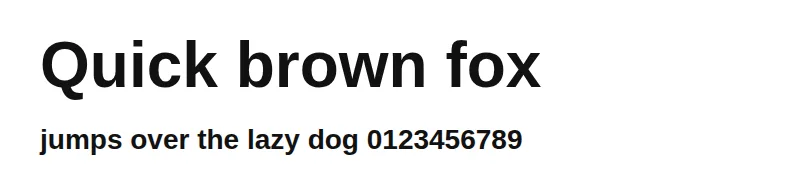
Every render was sent to the real renderer of CurlShot, with a delay from none to 3 s. Each picture was compared pixel by pixel with three reference pictures of the same page: the web font, the fallback font and invisible text. The three are below. A picture that matched none was counted apart; only 5 of the 405 did not match, and they were timeouts.
<style>
  @font-face { font-family: "Lab Face"; font-weight: 700;
               src: url(/font.ttf) format("truetype"); }
  h1 { font: 700 64px sans-serif; }
  html.web h1 { font-family: "Lab Face", sans-serif; }
</style>
<h1>Quick brown fox</h1>
<script>
  // The page asks for its font 0.4 s after load, like an app that sets its theme late.
  addEventListener("load", () => setTimeout(() => document.documentElement.classList.add("web"), 400));
</script>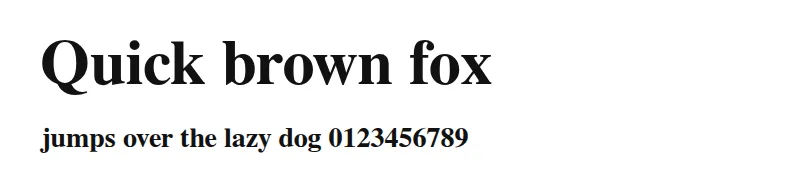
Web font
What the page should look like.
Fallback font
Same words, the wrong shapes and widths.

Invisible text
The block period of a font that has not arrived.
A font named in the CSS needs no wait
First the case most pages are: the font is in the page's own CSS and the text is in the markup. The font answered after 0 to 6,000 ms and the request had no delay. The cell is how many of five renders drew the web font.
| font-display | at once | 300 ms | 1,000 ms | 3,000 ms | 6,000 ms |
|---|---|---|---|---|---|
| auto | 5 of 5 | 5 of 5 | 5 of 5 | 5 of 5 | 5 of 5 |
| swap | 5 of 5 | 5 of 5 | 5 of 5 | 5 of 5 | 5 of 5 |
| fallback | 5 of 5 | 5 of 5 | 5 of 5 | 0 of 5 | 0 of 5 |
| optional | 0 of 5 | 0 of 5 | 0 of 5 | 0 of 5 | 0 of 5 |
The default and swap drew the web font in 50 of 50 renders, with the slowest taking 6.5 s. fallback did it only when the font came within 1 s, and optional never did: 0 of 25.[1] The two are working as written. A fallback period is short, and an optional font is for the next visit.
The renderer waits for the font, but its source has no line that says so. A search of its files finds no call to document.fonts. The wait is in the browser library: before each screenshot, Playwright 1.63.0 evaluates document.fonts.ready and holds the capture until it resolves, unless an environment variable turns that off. The promise resolves when no font is loading.[2] That is how the library source reads on 12 November 2026. So a font that is already requested is waited for.
- auto
- The default. Chromium treats it like block: invisible text for up to 3 s, then the fallback, then a swap when the font arrives.
- swap
- Fallback text at once, swapped when the font arrives.
- fallback
- A very short invisible period, then the fallback; the swap is allowed for a short time only.
- optional
- A very short invisible period, then the fallback, and no swap at all.
A font the page asks for late
Now the late page: it asks at 400 ms. The request was html with a delay of 0 to 3 s, and the font answered after 0, 300 or 1,000 ms. Five renders a cell, 120 renders in all.
| Font answers in | none | 0.25 s | 0.5 s | 0.75 s | 1 s | 1.5 s | 2 s | 3 s |
|---|---|---|---|---|---|---|---|---|
| at once | 0 of 5 | 0 of 5 | 5 of 5 | 5 of 5 | 5 of 5 | 5 of 5 | 5 of 5 | 5 of 5 |
| 300 ms | 0 of 5 | 1 of 5 | 5 of 5 | 5 of 5 | 5 of 5 | 5 of 5 | 5 of 5 | 5 of 5 |
| 1,000 ms | 2 of 5 | 3 of 5 | 5 of 5 | 5 of 5 | 5 of 5 | 5 of 5 | 5 of 5 | 5 of 5 |
The line falls at 0.5 s in all three rows. Before it, 24 of 30 renders (80%) showed the fallback font or invisible text. From it, 0 of 90. The font's own speed did not move the line: a font that took a full second reached five of five at 0.5 s as well.
The reason is the section above. A render that waits for fonts waits for the ones already asked for. At a delay of 0.5 s the page has asked, so the capture then waits for the file. Before that, nothing is pending and the capture goes ahead with the fallback. The 1,000 ms row shows some web-font pictures even with no delay. The cause was not isolated: on a busy host a render can reach the 0.4 s mark before its capture starts.
Renders with the wrong font, by delay (15 each)
- none13 of 15
- 0.25 s11 of 15
- 0.5 s0 of 15
- 0.75 s0 of 15
- 1 s0 of 15
- 1.5 s0 of 15
- 2 s0 of 15
- 3 s0 of 15
The number belongs to the page
Same test, same font answering in 300 ms, but the script now waits 1,200 ms before it asks.
| Page asks at | none | 0.5 s | 1 s | 1.5 s | 2 s | 3 s |
|---|---|---|---|---|---|---|
| 1.2 s | 0 of 5 | 0 of 5 | 0 of 5 | 5 of 5 | 5 of 5 | 5 of 5 |
Up to a 1 s delay, 15 of 15 renders had the fallback font. From 1.5 s, 0 of 15. So 0.5 s is not a property of web fonts or of the renderer. It is the page's asking time, 0.4 s, plus a small margin. A delay that works for your page today stops working when a script is added in front of the font request.
Two other waits give different answers, and the table says which page each one helps:
| How the page is sent | Page asks at 0.4 s | Page asks at 1.2 s |
|---|---|---|
html with wait_until=networkidle | 15 of 15 | 0 of 5 |
An address (url), nothing set | 20 of 20 | Not tested |
networkidle for html input waits for 500 ms without a request. The 0.4 s request breaks that quiet spell, the 1.2 s one comes after it. The docs advise wait_until=networkidle or a short delay for fonts that show late; this test says that holds for a page that asks within about half a second of load, and not beyond.
An address sent as url does better because it goes through a settle step that html input skips: the renderer waits up to 3 s for the network to go quiet and up to 3 s more for the picture to stop changing, taking small frames of the window and comparing them. The late font changed the picture, so the step kept waiting. It drew the web font in 20 of 20 renders, with the font taking up to 6.3 s. A page that asks later than that quiet spell would still slip through.
The fix is a marker, not a longer delay
Ask the page to say when the font is there, and wait for that. Two lines in the page, one option in the request. wait_for_selector holds the capture until the element is visible, so the time it takes is the time the font takes.
document.fonts.load('700 64px "Lab Face"').then(() => {
  document.body.dataset.fonts = "ready";
});# Needs jq. The key stays in the ACCESS_KEY variable on your server.
jq -n --rawfile html card.html \
'{html: $html, viewport_width: 1200, viewport_height: 630, wait_for_selector: "body[data-fonts=ready]"}' |
curl -X POST "https://curlshot.com/api/v1/screenshot" \
-H "X-Access-Key: $ACCESS_KEY" \
-H "Content-Type: application/json" \
-d @- \
--output card.pngThe marker has to come from document.fonts.load(), which asks for the font and resolves when it is in.[3] Do not use document.fonts.ready for it. That promise resolves when no font is loading, which is true before a late request is made, so the marker is set too early.
| Marker set by | html, 25 renders | url, 25 renders |
|---|---|---|
document.fonts.ready | 11 of 25 | 25 of 25 |
document.fonts.load(), first run | 21 of 254 timed out | 24 of 251 timed out |
document.fonts.load(), re-run with a 60 s timeout | 15 of 15 | Not re-run |
The marker from fonts.ready drew the web font in 11 of 25 html renders. That is the wrong fix, and it looks like a working one on a quiet day, because it sometimes sets the marker after the request. The marker from fonts.load() drew it every time it finished. Five renders did not finish: four html and one url render ended with a timeout while the host's load average was above 30, and they were consecutive renders. Re-run later with a 60 s timeout and a load near 10, the html cells drew the web font in 15 of 15, the font answering after at once, 1,000 ms, 3,000 ms, with median times of 1.8 s, 4.0 s, 5.0 s. The cause of the stall was not isolated. Set timeout above the longest font you expect.
What to do, by case
- The font is in your CSS and the text is in the markup. Send nothing extra. Use
font-display: swapor leave it out, becauseoptionaldraws the fallback. - A script picks the font or the text. Add the marker and
wait_for_selector. It is the only option here that does not depend on a number you guessed. - You cannot change the page. Send it as an address if it is public: the settle step caught the late font in 20 of 20 renders. For html, use a delay longer than the asking time, with 0.5 s as the least that worked for a page that asks at 0.4 s.
- Social cards. A card that falls back to a system font still ships and looks wrong. For an Open Graph image, check one render per template with the fonts you ship, not one per post.
How it was run
On 12 November 2026. Each case is five renders. The real renderer process of the product ran on a Linux server (Chromium 153.0.8010.12, Playwright 1.63.0, an 800 x 300 window) and was sent each page as html, or as an address on a local server. A local server answered the font file (a 2 MB bold serif) after a set time. Each picture was compared with three reference pictures of the same page: the web font, the fallback font and invisible text.
405 renders in all: 100 on pages that name the font in CSS, 120 for the delay sweep, 20 through an address, 100 for the two markers, 30 for the page that asks at 1.2 s, 15 re-runs and 20 with networkidle. The renderer was the real process of CurlShot, started on the same machine, so no call to the API was sent and no plan was used. The host was shared with other jobs and busy, so the times are medians and not a speed test.
The pages are small and made for one question each. A real page that asks for many fonts, weights and subsets may take longer to ask for all of them, and a font on a slow network will take longer than a local server. PDF output was not tested. One successful render is one screenshot, so a wait costs time and no extra screenshots; see pricing for the free plan.
Related reading
Questions people ask
Why does my HTML to image render show the wrong font?
Most likely the page asks for the font after the capture has started. A font named in the page's CSS is waited for: 50 of 50 renders drew it, even at 6 s. A font a script requests later is not: 24 of 30 renders captured within 0.5 s of load showed the fallback or invisible text. Also check font-display: optional never swaps in the font.
Does a delay fix web fonts in a screenshot?
Only if it is longer than the time the page takes to ask for the font. On the 0.4 s test page every delay from 0.5 s worked (90 of 90), on the 1.2 s page it took 1.5 s. The font's own download time did not matter, because the browser waits for a font it has asked for. A marker is safer than a number you have to guess.
Do I need wait_until=networkidle for fonts?
Not for fonts named in the page's CSS. For html input it caught a font requested 0.4 s after load (15 of 15) but not one requested at 1.2 s (0 of 5), because it waits for 500 ms without requests and the later request came after that quiet spell.
How do I wait for a web font in a screenshot API call?
Have the page set an attribute when document.fonts.load() resolves, then send wait_for_selector with that attribute. In the test it drew the web font in 15 of 15 renders on a quieter host, with the font answering after 0, 1,000 or 3,000 ms. Do not use document.fonts.ready for this: it resolved before a late request in most renders (11 of 25 drew the font).
Which font-display value is safe for HTML to image?
auto and swap drew the web font in 50 of 50 renders. fallback drew it when the font arrived within 1 s but not when it took 3 s or 6 s, and optional drew the fallback every time (0 of 25). If the picture matters more than the page's first paint, use swap in the HTML you send to CurlShot.
Sources
- [1]MDN Web Docs, font-display. Checked .
- [2]MDN Web Docs, FontFaceSet: ready property. Checked .
- [3]MDN Web Docs, FontFaceSet: load() method. Checked .
Read next
- CookbookHTML to image: six templates you can copySix copyable HTML and CSS templates: social card, certificate, receipt, quote card, ticket and stat card, with sizes and the rules that make them render right.
- Migration notesFrom html-to-image to an API: migration notesEvery html-to-image option and what replaces it in a screenshot API, plus a test of eight pages: the library and html2canvas against a real browser.
- Field guideWhy website screenshots look wrong, and the fixesA field guide to 11 ways a website screenshot goes wrong, from blank lazy images to cookie banners and cut-off pages, with the cause and the fix for each.