Ads, popups, chat bubbles: before and after
Ten test pages, each with one overlay a real site might show. Drag the handle to see the page before and after the option that removed it, then read what that option cost. Three of the ten did not go away cleanly the first time.
 BeforeAfter
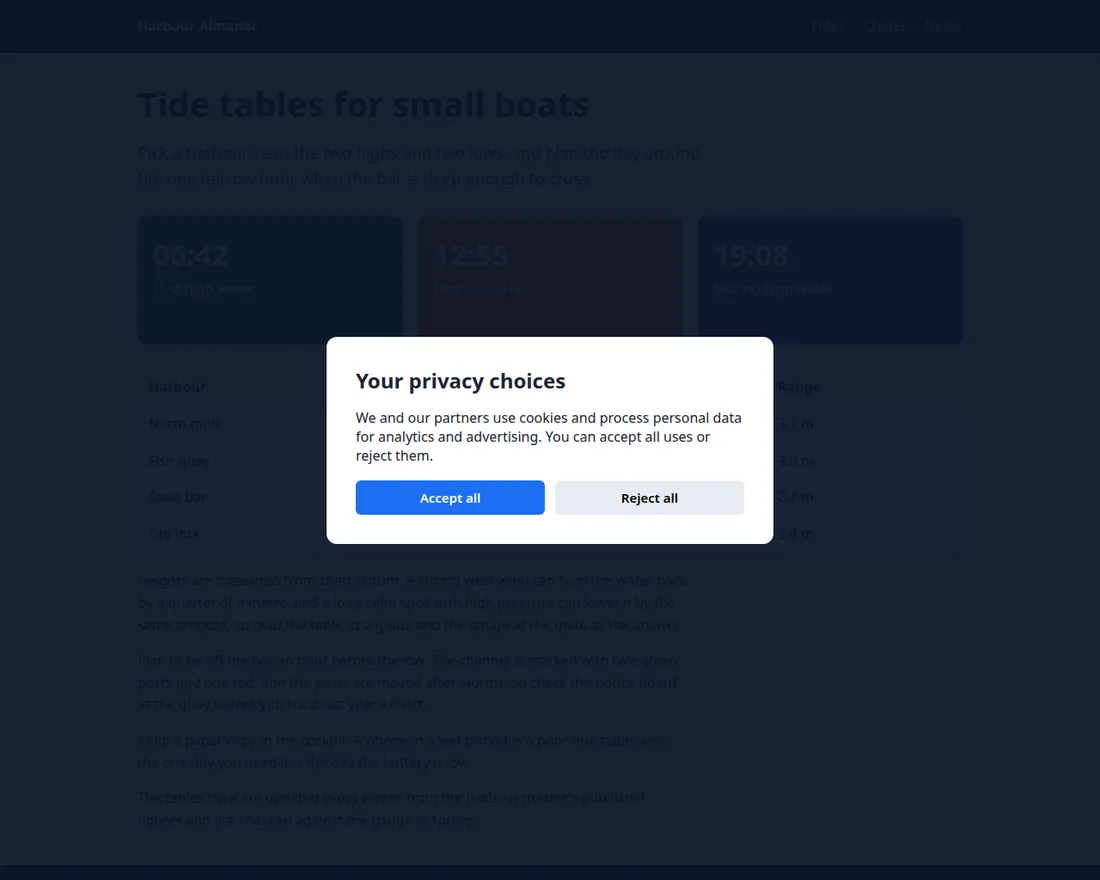
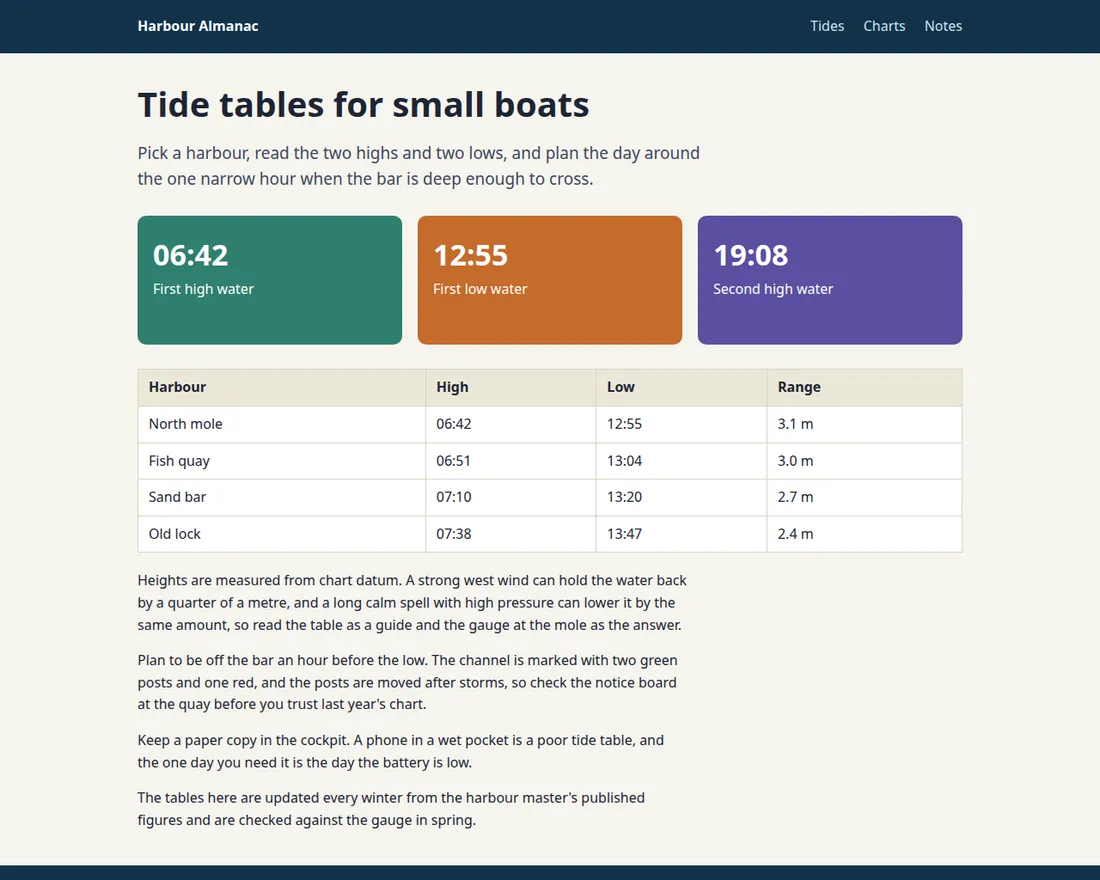
A full-screen dark layer with a privacy card in the middle. The page behind it is locked: scrolling is switched off on html and body.
Removed cleanly
- Option
- block_cookie_banners=true
- What removed it
- The sweep finds a fixed layer with consent wording and a button, sets display: none on it and, because it covers more than half the window, lifts the scroll lock.
- What it costs
- Nothing was lost in this run. The full-page picture is 1,085 px tall, the same as with the wall. Nothing is clicked on this card, so no consent choice is made.
Every option and what it left behind
One row for each option tried. The first row of a page is the option you would try first. Pixels changed is the share of the picture that differs from the before picture; when the page moves up, the text moves with it, so a closed gap shows a big share. The full-page height is read from a second capture of the same page.
| Test page | Option | Result | Pixels changed | Full-page height | Requests stopped |
|---|---|---|---|---|---|
| Consent wall | block_cookie_banners=true | Removed cleanly | 95.7% | 1,085 → 1,085 px | 0 |
hide_selectors=#gate | Removed cleanly | 95.7% | 1,085 → 1,085 px | 0 | |
| Banner ad | block_ads=true | Removed, but a gap is left | 18.3% | 1,359 → 1,359 px | 1 |
block_ads=true&hide_selectors=.ad-slot | Removed cleanly | 49.9% | 1,359 → 1,085 px | 1 | |
| Chat bubble | block_chats=true | Removed cleanly | 1.9% | 1,085 → 1,085 px | 1 |
| Consent tool banner | block_cookie_banners=true | Removed cleanly | 9.2% | 1,085 → 1,085 px | 1 |
| Home-made cookie bar | block_cookie_banners=true | Removed cleanly | 7.3% | 1,085 → 1,085 px | 0 |
| Same bar, 800 px window | block_cookie_banners=true | Not removed | 0.0% | 1,085 → 1,085 px | 0 |
hide_selectors=#notice | Removed cleanly | 9.5% | 1,085 → 1,085 px | 0 | |
| Bar that comes late | block_cookie_banners=true | Removed cleanly | 5.7% | 1,085 → 1,085 px | 0 |
block_cookie_banners=true&delay=1 | Removed cleanly | 5.7% | 1,085 → 1,085 px | 0 | |
| Newsletter popup | delay=1&hide_selectors=#join-modal,.join-backdrop | Removed cleanly | 96.2% | 1,085 → 1,085 px | 0 |
delay=1&block_requests=join-popup | Removed cleanly | 96.2% | 1,085 → 1,085 px | 1 | |
| Sticky promo bar | hide_selectors=.promo-bar | Removed, but a gap is left | 5.4% | 1,141 → 1,141 px | 0 |
hide_selectors=.promo-bar&styles=body{padding-top:0!important} | Removed cleanly | 37.5% | 1,141 → 1,085 px | 0 | |
| Tracking script | block_trackers=true | Nothing to see: the picture did not change | 0.0% | 1,085 → 1,085 px | 1 |
Three ways an overlay goes away
Overlays are mostly elements that stay put when the page scrolls: an element with position: fixed keeps its place relative to the viewport.[1] That is why the same few tricks work across sites, and why each one has a place where it stops working.
Stop the request
block_ads, block_trackers, block_chats, block_cookie_banners, block_requests, block_resources
Works when: The overlay is made by a script or a file the page fetches. If the file never arrives, nothing is drawn.
Falls short when: The overlay is in the page's own markup, or comes from an address that is on no list and that you have not named. The space it reserved stays.
Hide it with CSS
hide_selectors, styles
Works when: You can name the element. display: none takes it out of the layout, as if it were not there.
Falls short when: The script still runs and may draw it again under another name. Whatever room the page made for it stays unless a second rule gives it back.
Find it and press the button
block_cookie_banners
Works when: A consent banner of a known tool, or a home-made one that is fixed to the window and talks about cookies.
Falls short when: A bar that no probe point touches, a banner with no button the code recognises, or a popup that is not about consent.
Hiding with display: none takes an element out of the layout as if it were not there,[2] which is why hiding the container closes a gap that blocking the request leaves open. The page you ask for is never blocked, only the files it pulls in.
Where the first try failed
A bar that floats clear of the edge
The home-made cookie bar was hidden at the default window height and left in place at 800 px. Nothing else changed between the two runs. The code that finds home-made banners looks at 25 points, 2%, 25%, 50%, 75%, 98% of the window width and the same five fractions of its height. A fixed box with cookie wording and a button under any of them is hidden. This bar sits 16 px above the bottom edge and is 78 px tall.
The points were counted by asking the browser which element sits at each one on the same page. The grid is read from the renderer source; the count is a re-run of it, not a log of the renderer. The full-width bar of the late-bar page, glued to the bottom edge, was found at 1024 px; other heights were not tried. For a card that floats clear of the edge, name it with hide_selectors instead of leaning on the sweep.
A hole where the ad was
block_ads stopped the ad script and the banner never drew. The slot around it had a fixed height of 250 px, so the page stayed 1,359 px tall and a 274 px hole sat between the intro and the cards. The same happened with the sticky promo bar, where the page kept 56 px of padding for a bar that was gone. Both closed with a second rule: hide_selectors for the slot, styles for the padding.
Looked for, and not found
A scroll lock that shortens the picture
The wall and the popup both switch scrolling off, and hiding them with CSS does not switch it back on. The full-page picture was 1,085 px tall with the overlay, after block_cookie_banners and after hide_selectors alone. No cost showed up in this window.
A picture that changes when a tracker is blocked
None of the pixels moved. The script was fetched once per render before and not at all after. The gain is in the statistics of the site you captured, not in the picture.
What the options cost on a clean page
Most pages you capture have nothing to remove, so the first cost to know is what the options add when there is nothing to find. The same article without any overlay was rendered 12 times with each option set, in turn, and the bars show the median with the fastest and slowest run as a line of text.
No blocking options
1,576 ms
Fastest 1,407 ms, slowest 1,757 ms
block_cookie_banners
1,661 ms (+85)
Fastest 1,564 ms, slowest 2,027 ms
block_ads, block_trackers, block_chats
1,553 ms (−23)
Fastest 1,402 ms, slowest 2,139 ms
All four
1,667 ms (+91)
Fastest 1,514 ms, slowest 1,999 ms
The two sets that include block_cookie_banners have a median about a tenth of a second higher; the ranges overlap with the plain run, so the difference is small next to the noise. That option does the most work: it injects CSS, sweeps the page, and waits a moment for a late banner. The machine was busy with other jobs during the run, so treat the figures as an order of size. delay is a different kind of cost: it adds its whole wait to every render.
One request that uses all of it
The four switches first, because they cost the least to keep up. The selectors and the style rule come from the cards above; swap them for the ones on your own page. To find them, open the page in your browser, press F12 and look at the Elements tab for the element and at the Network tab for the address of a script.
curl -G "https://curlshot.com/api/v1/screenshot" \
  --data-urlencode "access_key=YOUR_ACCESS_KEY" \
  --data-urlencode "url=https://example.com/article" \
  --data-urlencode "block_ads=true" \
  --data-urlencode "block_trackers=true" \
  --data-urlencode "block_chats=true" \
  --data-urlencode "block_cookie_banners=true" \
  --data-urlencode "hide_selectors=.ad-slot,.promo-bar,#join-modal,.join-backdrop" \
  --data-urlencode "styles=body{padding-top:0!important}" \
  --data-urlencode "delay=1" \
  --output clean.png
Every switch is off by default, so a plain request shows the page as a first-time visitor sees it. The options are described in the blocking guide, and the selector options in custom CSS, JavaScript and clicks.
How it was run
On 12 November 2026, in Chromium 153.0.8010.12 through Playwright 1.63.0. Ten small pages, each the same tide-table article with one overlay added, were served from a local web server and rendered by the capture renderer process of the product with the options named on each card. Each case was rendered five times and once more as a full-page capture to read the page height. The window is 1280 x 1024, the default, except where a card says 800.
No call to the public API was sent. The renderer process of CurlShot was started on its own and driven with the same options the API passes it, and the numbers above are read from its answers. The test pages are small and made for one question each, and none of them is a page from a real site, so the result says what each option does to that overlay, not what it will do to yours. Pages with their own timing, other scripts or another window height can differ.
A free account is enough to try every option on this page; see pricing for what it includes. The tool pages for screenshots without ads and without cookie banners let you try one request in the browser.
Related reading
Questions people ask
How do I take a screenshot without ads?
Add block_ads=true to the request. CurlShot then stops requests to known ad networks before they leave the browser, so the ad is never drawn. The space the ad would have filled can stay empty; in the test it was a 274 px hole. Add hide_selectors with the class of the ad slot to close it.
How do I remove a cookie banner from a screenshot?
Add block_cookie_banners=true. It stops the scripts of well-known consent tools, hides their banner layouts, presses a button in a consent dialog it finds, and hides fixed overlays that carry cookie wording. For a banner it misses, hide_selectors with its id or class removes it.
Why does the cookie banner still show on my capture?
The sweep that finds home-made banners probes 25 points of the window. A bar that floats clear of the window's edge can fall between them: in the test, a bar 16 px above the bottom was missed at 800 px of height and hidden at 1024. Hide it by id or class with hide_selectors, which does not depend on the window.
Why is there blank space where the ad or the bar was?
Blocking stops the file, not the layout. If the page reserved room for the element, with a fixed height, a margin or padding, that room stays. Hide the container with hide_selectors, and for a fixed top bar add a styles rule that removes the padding the page made for it.
Does blocking chat widgets or trackers change the screenshot?
Blocking a chat widget removes its bubble and nothing else in the test. Blocking a tracker changed no pixel at all: it stops the analytics beacon, so the capture does not count as a visit. Both only work for scripts loaded from an address on the list.
Do the block options make a capture slower?
Not by much. On a page with nothing to remove, block_cookie_banners added 85 ms to the median render in 12 alternating rounds, and blocking ads, trackers and chats added nothing beyond noise. delay is different: it adds its full wait every time. The test ran on a busy machine, so read the numbers as an order of size.
Read next
- AnatomyHow cookie banners work, and how to hide themA cookie banner taken apart layer by layer: why sites show one, how it works, and three ways to remove it from a screenshot, with what each leaves behind.
- PlaygroundCSS selectors for element screenshotsType a CSS selector, see what it matches on a specimen page and what a capture returns. With a cheat sheet, a robustness ranking and fixes.
- Field guideWhy website screenshots look wrong, and the fixesA field guide to 11 ways a website screenshot goes wrong, from blank lazy images to cookie banners and cut-off pages, with the cause and the fix for each.